
Check Input
What is Check Input
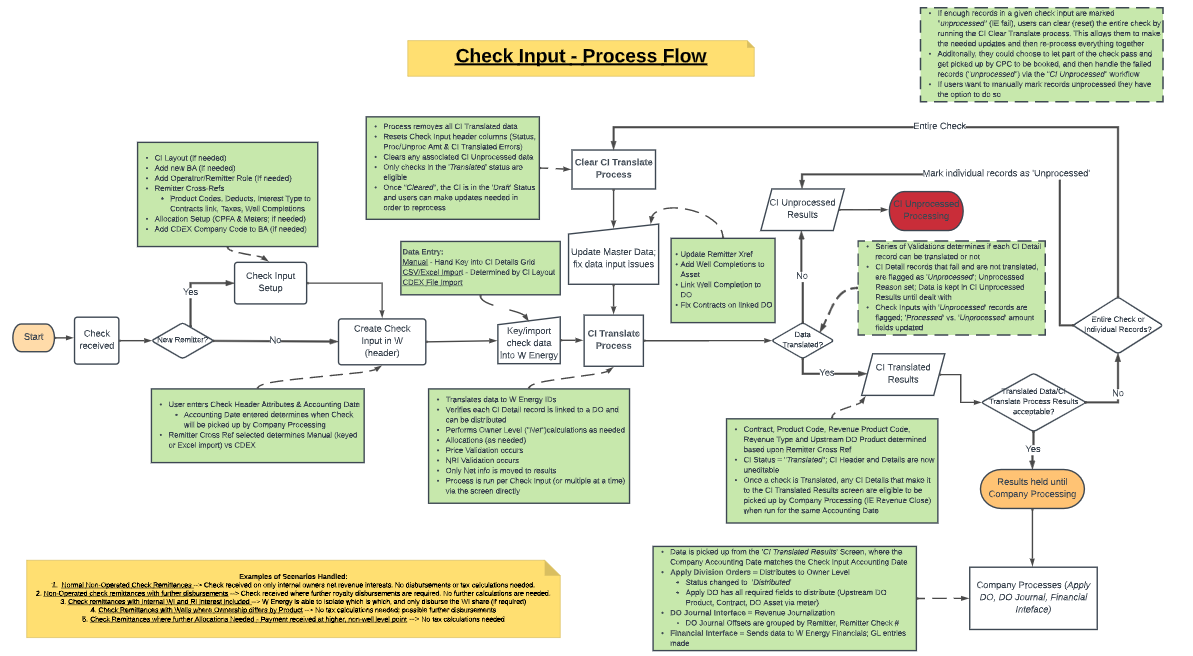
Check Input is the main method of processing revenue on non-operated wells by allowing the client to input the raw data exactly as seen on the check. Typically Check Input will process the internal entity’s (client’s) net share, though the system does support distribution to external entities. Check inputs are set up by the user and match up to a particular meter, owner, and interest type.
The Check Input Module is only used when the client has any non-operated wells that they receive checks from.
Why would a client use Check Input
W’s Check Input module allows the client to input checks into the system exactly as seen on the check. The system will translate any raw data into W’s format based on a one-time setup of the Remitter Cross-Refs. This process is integrated with the other areas of W software which saves users time and avoids costly mistakes on complicated setups.
Who benefits from the use of Check Input
Clients who receive checks from external entities for their share of non-operated wells see great value in our Check Input module. Our users and their counterparties benefit by having faster and consistently accurate data. It is very important that our clients are able to quickly process and distribute checks.
What Configurations apply when using Check Input
disburse_check_inputs: true
ci_owner_net_check: true
ci_decimal_check: true
ci_decimal_check_error: true
Configuration | Description | Functionality |
disburse_check_inputs | Check Input data will be picked up in Apply DO | Must be TRUE |
ci_owner_net_check | Owner Net vs. Computed Net | Validation during CI Translate compares Net amount entered on a CI Detail Line vs. a computed amount |
ci_decimal_check | NRI Validation allowable Variance | Validation during CI Translate compares CI Detail Interest entered vs. NRI on Waterfield Lifecycle --> Drives the Variance % before awarning will fire |
ci_decimal_check_error | NRI Validation cause error | Validation during CI Translate compares CI Detail Interest entered vs. NRI on Waterfield Lifecycle --> When TRUE, CI Detail lines that fail validation will be marked "Unprocessed" |
How to Setup and Use Check Input
See the concept documentation linked below:
Check Input Processes
W Energy - Check Input Setup and Configuration_Guide_v1_3.xlsx
Check Input Monthly Process
Receive Checks
Money is received; Non-AR Cash Receipt entry is made in Financials to book cash.
Receive Check Details
Revenue details are received in PDF or CSV/Excel format.
Create Check Input Header
Define Remitter, CI Layout and Accounting Date, then enter the check number, amount, and date.
Enter/Import Check Input Detail records
User can input data manually or import from file (CSV/Excel or CDEX) and update Remitter Cross Refs as needed.
Run CI Translate
After clicking Run CI Translate, the system will translate the Remitter data to W Energy IDs.
How does this concept impact/feed other areas in the application?
At the end of the Check Input module process, CI Translated Results are produced. These results are used during Company Processing to be “distributed” to owners, journalized as GL entries, and interfaced into the Financials Module
Common Scenarios
Normal Non-Operated Check Remittances - Check received on only internal owners net revenue interests. No disbursements or tax calculations are needed.
Non-Operated check remittances with further disbursements - Check received where further royalty disbursements are required. No further calculations are needed.
Check remittances with Internal WI and RI interest included- W Energy is able to isolate which is which, and only disburse the WI share (if required)
Check Remittances where further Allocations are Needed - Payment received at higher, non-well level point.No tax calculations needed