Financials - TROY - Adjusting Check Layout for New Bank Requirements
🤔 Problem
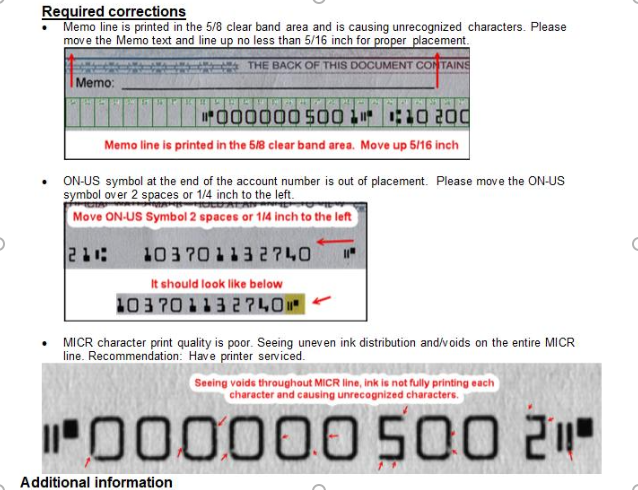
A new bank required a different check format. The check was rejected by the bank, so layout adjustments are needed.
🌱 Solution
Step 1: Confirm Check Style
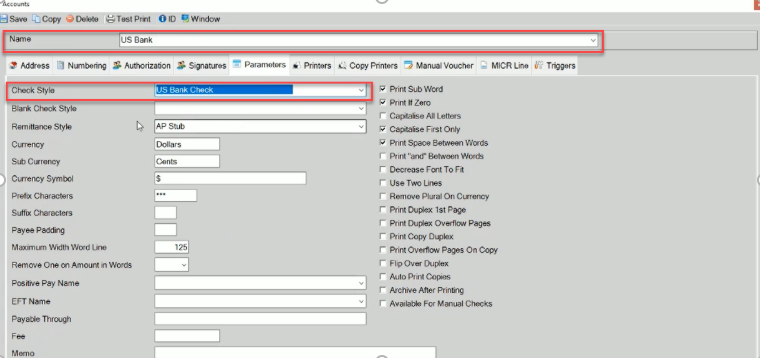
For each check needing adjustments, verify the check style assigned to the account.
Navigate to: Accounts → (select Account Name from dropdown) → Parameters tab.
Note which Style will require MICR line value adjustments.
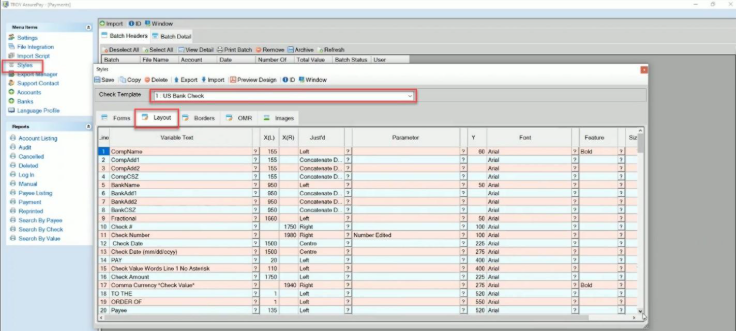
Step 2: Edit Layout for US Bank Check
Note: In AssurePay, all x and y measurements are in tenths of centimeters.
Go to Styles → (select the verified Check Style) → Layout Tab.
Layout Issue 1: Memo Line Needs to be Raised
Navigate to the Memo Line Variable Text field.
Adjust the x(L), x(R), and Y values.
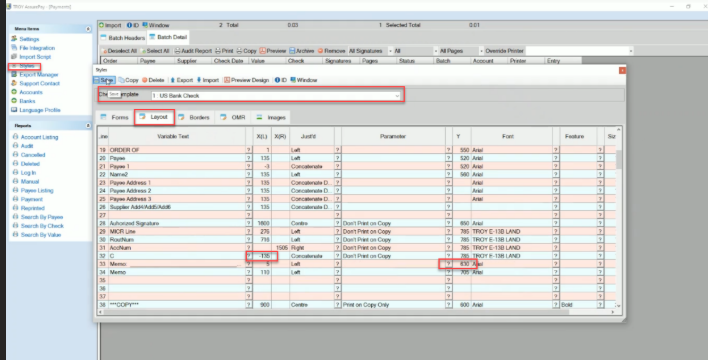
Example: Change the Y value from 710 → 630 to raise the memo line by 5/16 inch.
Layout Issue 2: Move ON-US Symbol Left
Navigate to the C Line Variable Text field.
Adjust the x(L), x(R), and Y values.