
Payment Obligation Processes
What is the Payment Obligation Land Process
The Payment Obligation Land Process is a process used to generate payable or receivable payment obligation results. These results are then reviewed and/or approved by a Land Analyst, Lease Analyst, or and/or Landman. Recommendations may be made as to whether or not to pay the amount due or place it on hold. Payment Obligations (payable or receivable) that are approved to pay/receive can then be processed to create payable/billable results. Additional steps in the Payment Obligation Process allow land users to confirm how the payments will ultimately be journaled and if valid, create AP and AR Invoices in Financials that will be used to generate payments and invoices.
Why would a client use the Payment Obligation Land Process
Clients who need to pay lease obligations would use the Payment Obligation Land Process to generate the payable obligation result, review it for payment, and ultimately create and make a payment. Typical groups that receive payment obligation payments include land owners, operators, and State/Federal/Tribal entities.
Companies who own minerals and must track incoming payments on company owned minerals can also benefit from this process by generating receivable obligation results, reviewing/approving them, and ultimately creating accounts receivable invoices to capture the incoming payment.
Where is the Payment Obligation Land Process executed
🧭 Land Processes / Land Process Control
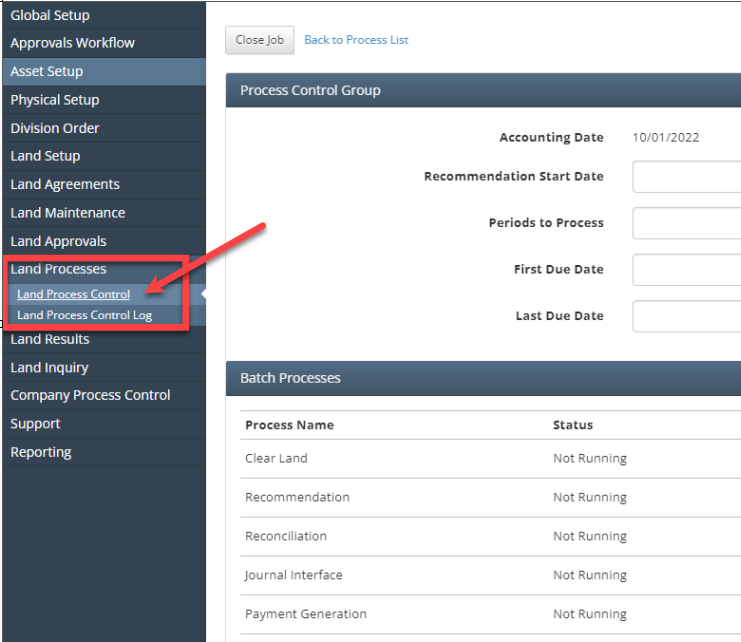
What Configurations apply for Payment Obligation Processing
Feature Configs
land: true

financials_integration:
    land: true
Prerequisites to the Payment Obligation Land Process
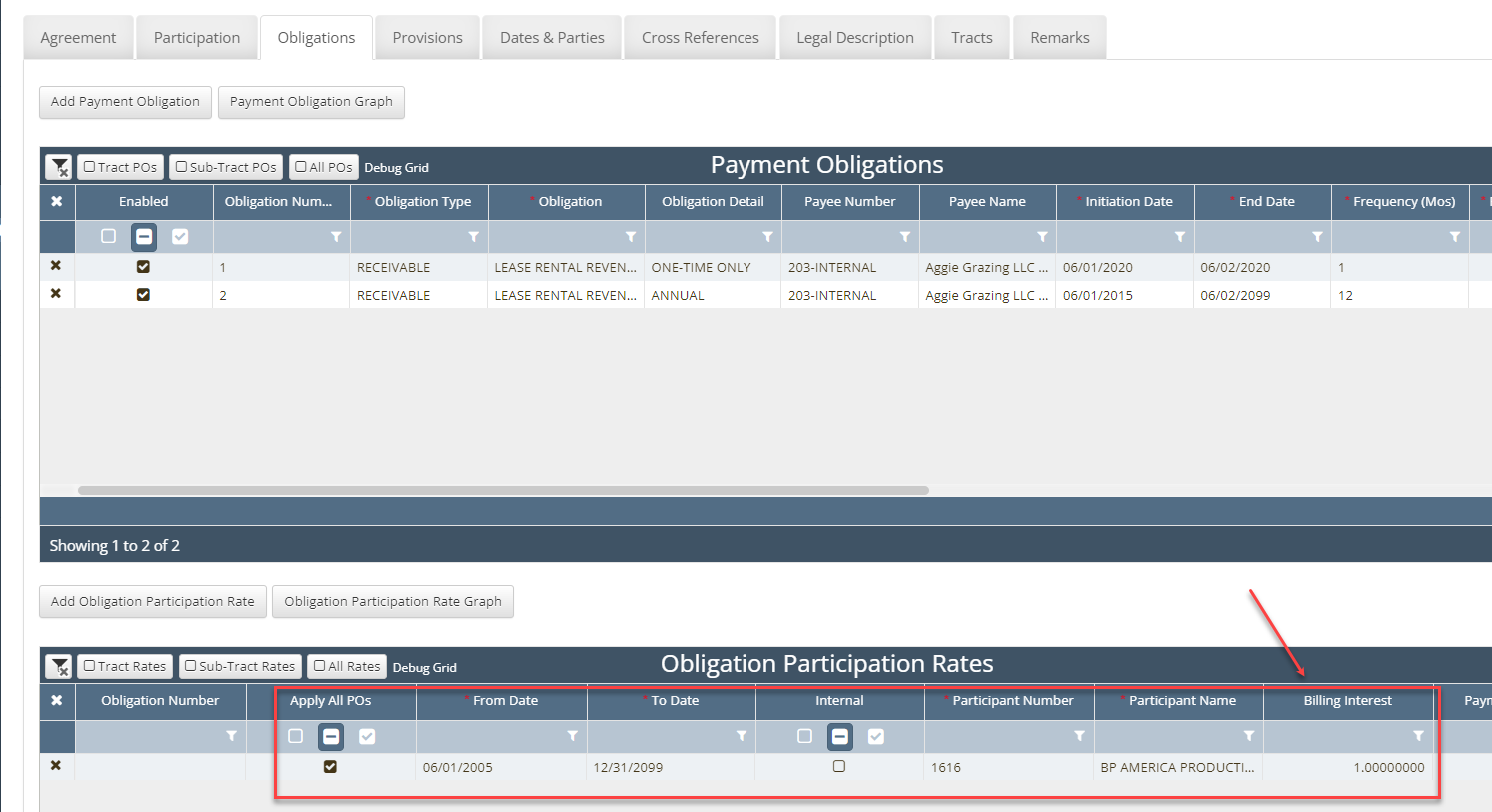
Before a payable or receivable obligation can be processed, a payment obligation must exist on the source agreement, tract, or sub-tract (i.e. tract depth severance). The obligation must also be effective for the time period being processed.
🧭 Land Agreements / Agreements / Obligations tab
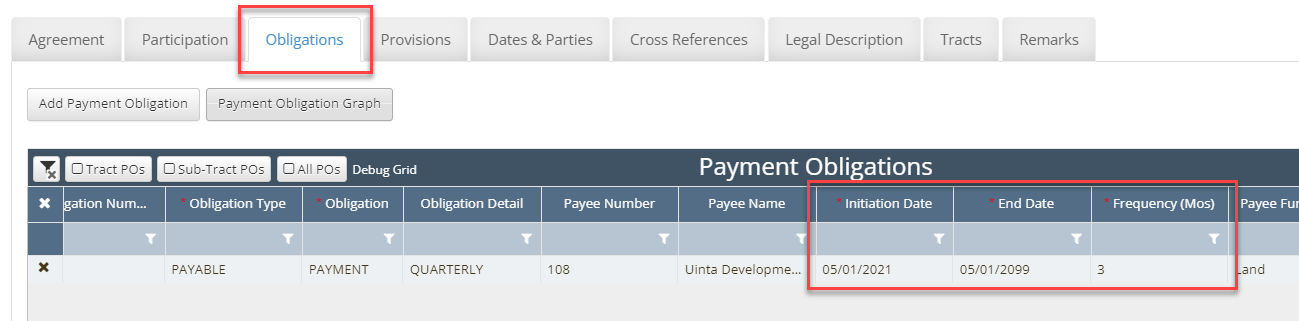

Participants entered into the Obligation Participation Rates grid that are assigned to an obligation in the Payment Obligations grid (pictured above) will override the participant in the Payment Obligations grid, should one exist in that grid as well.
Payables and Billables will be made to the owners in the Obligation Participation Rates grid in lieu of the owners in the Payment Obligations grid. This grid is most frequently used for the following reasons:
Obligation payments that must be split to multiple participants
Obligation payments that require a billable invoice be generated
Receivable obligations where an accounts receivable invoice is needed
For instructions on how to create the pre-requisite to this process please see the related document located here: [Future Link to the Payment Obligation training page]
How to create a Payment Obligation Land Process
Create a Process Control Group and enter the Control Group header fields
Navigate to the Land Processes / Land Process Control screen
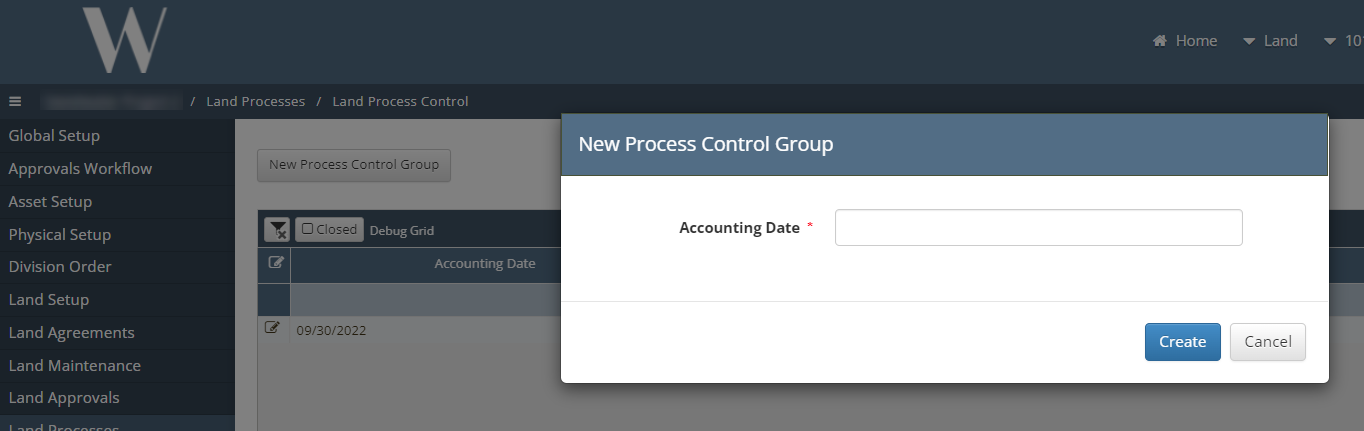
Click the New Process Control Group button
Enter an Accounting Date into the pop-up prompt that appears on the screen
This date will ultimately be used when generating the accounts payable and accounts receivable invoices in Financials where the final payments will be generated
Enter values in the Process Control Group header fields
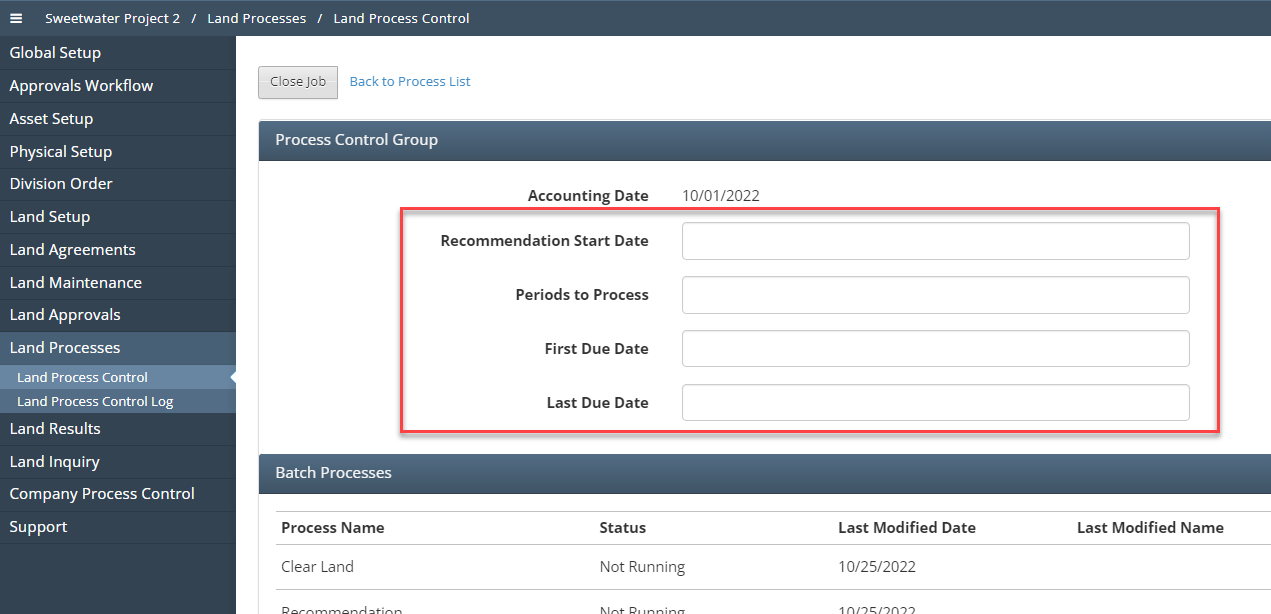
Understanding Payment Obligation Land Process Dates

Process Control Groups create Payment Obligation Results when the following two conditions are met:
The Recommendation Start Date must be <= The Source Obligation Payment Due Date
The Recommendation End Date must be >= The Source Obligation Payment End Date
Date | Formula | Example |
|---|---|---|
Recommendation Start Date | Date entered by user | 10/1/2022 |
Periods to Process | Integer entered by user | 2 |
Recommendation End Date | Recommendation Start Date + Periods to Process | If the Recommendation Start Date is 10/1/2022 and the Periods to Process is 2 → the Recommendation End Date would be 12/1/2022 (i.e. start date plus 2 months) |
Source Obligation Payment Due Date | Obligation Initiation Date + Frequency | If Initiation Date is 4/12/2022 and Frequency is 12 → The Payment Due Dates would be: 4/12/2022, 4/12/2023, 4/12/2024, etc every 12 months until the End Date is reached If the Initiation Date is 6/21/2021 and the Frequency is 1 → The Payment Due Dates would be 6/21/2021, 7/21/2021, 8/21/2021, etc every month until the End Date is reached |
Source Obligation Payment End Date | The earliest date between the Agreement Expiration Date and the Obligation End Date | If the Agreement Expiration Date is 5/3/2022 and the Obligation End Date is 12/31/9999, the Obligation Payment End Date is 5/3/2022 |
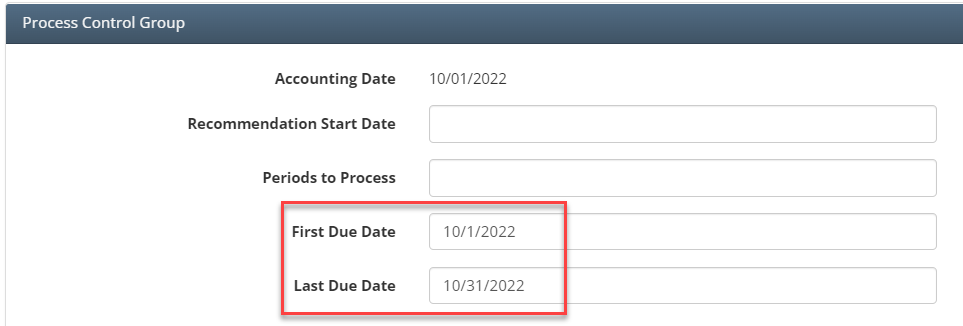
First Due Date | Value entered by user | 10/1/2022 |
Last Due Date | Value entered by user | 10/30/2022 |
Example - Source Obligation Payment Due Dates and Source Obligation Payment End Dates
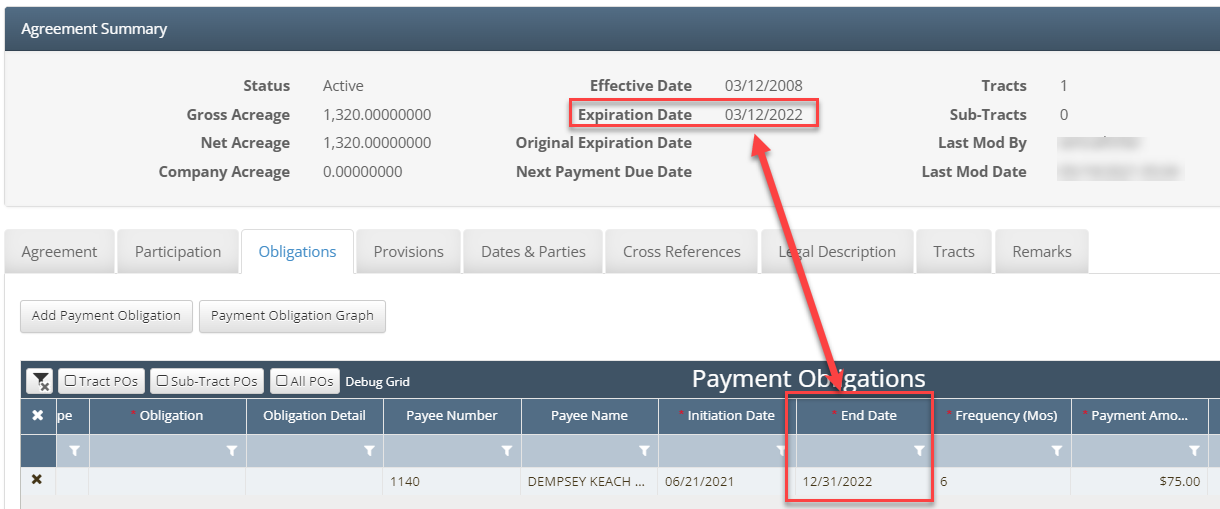
Expiration Date = 3/12/2022
Obligation Initiation Date = 6/21/2021
Obligation End Date = 12/31/2022
Obligation Frequency = 6
Payment Due Dates include 6/21/2021 and 12/21/2021
Initiation Date + 6 months
Payment Due Dates of 6/21/2022 and 12/21/2022 are not valid in this example because the Agreement Expiration Date is earlier then the End Date
If the Expiration Date was greater than the Obligation End Date, the 6/21/2022 and 12/21/2022 would be valid Obligation Payment Due Dates
The Basis field in the Payment Obligations grid (located after the Payment Amount field) allows for a selection of Acres, Flat, or One-Time. If One-Time is selected, the obligation will only ever have one Due Date and it will be the Initiation Date. To continuously generate reoccurring obligations, a Basis of Flat or Acres must be selected.
Example - Recommendation Start Dates and Recommendation End Dates
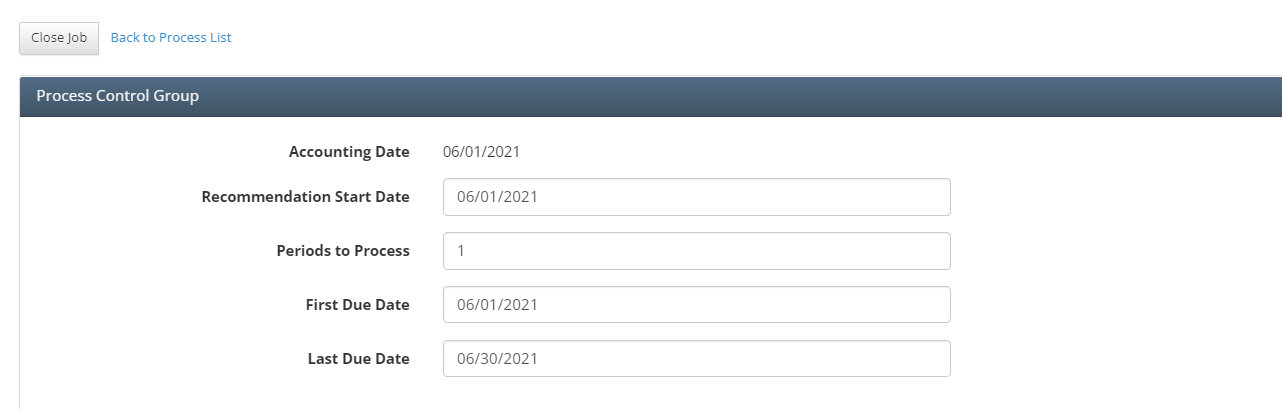
Recommendation Start Date = 6/1/2021
Periods to Process = 1
Recommendation End Date = 6/30/2021
I.e. Start date plus 1 month
Executing Batch Processes
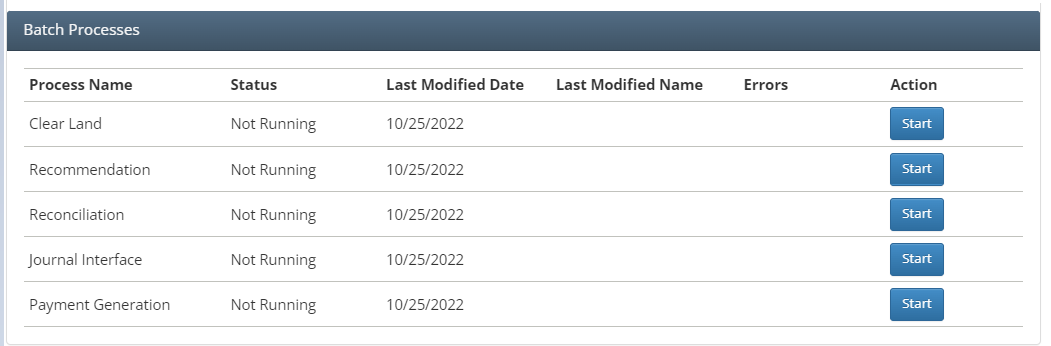
Clear Land
This process is used to remove obligation results that have been generated incorrectly. The following conditions must be met or the obligation result will not be cleared:
None of the header field values in the Process Control Group section have changed
The Obligation Workflow Status [from the Land Payment Obligation Results grid] is Draft or Rejected
This process can also be used to remove Land Journal Results if Payables and Billables are journaled to incorrect accounts and updates are needed to Journal Components.
Recommendation
This process is used to create payment obligation results based on the effective dates of the Process Control Group and the effective dates of the source obligations. These results are sourced in Land Results / Payment Obligations and then also displayed visually on the Land Results / E-Calendar.
E-Calendar
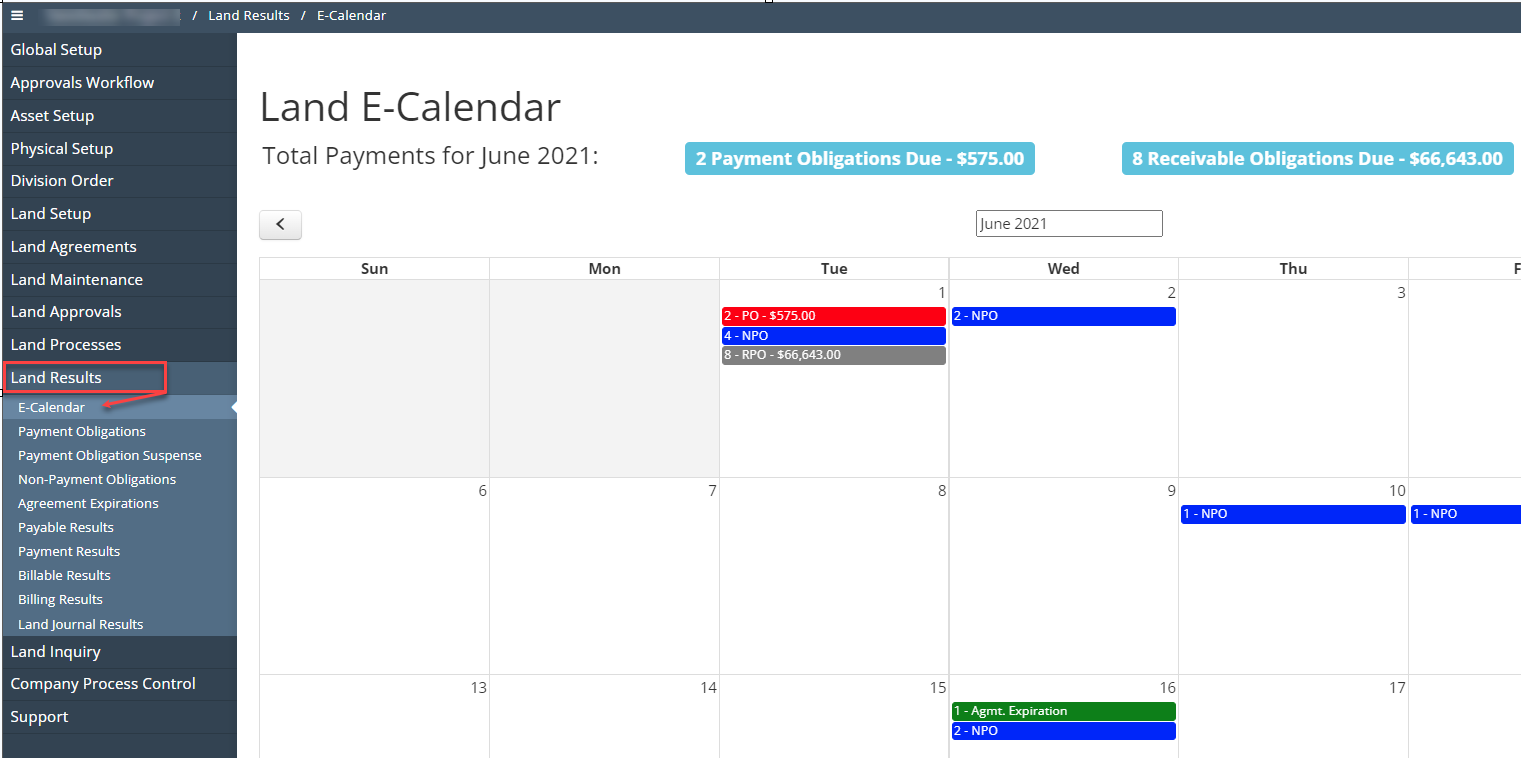
The colorful bars on the E-Calendar are interactive links. Clicking on a bar will take the user to the Obligation Results grid and systematically apply the necessary grid filters to view only the obligations due on the date that was clicked by the user.
Red [PO]→ Payment Obligations, Count of Payable Payment Obligation Results Due, Total Value
Blue [NPO] → Nonpayment Obligations, Count of Nonpayment Obligation Results Due
Grey [RPO] → Receivable Payment Obligations, Count of Receivable Payment Obligation Results Due, Total Value
Green [Agmt Expiration] → Agreement Expiration, Count of Agreement Expirations Due
Land Results → Payment Obligations grid
The Payment Obligations grid under the Land Results menu displays all payment obligation results generated from past and present Land Process Control groups.
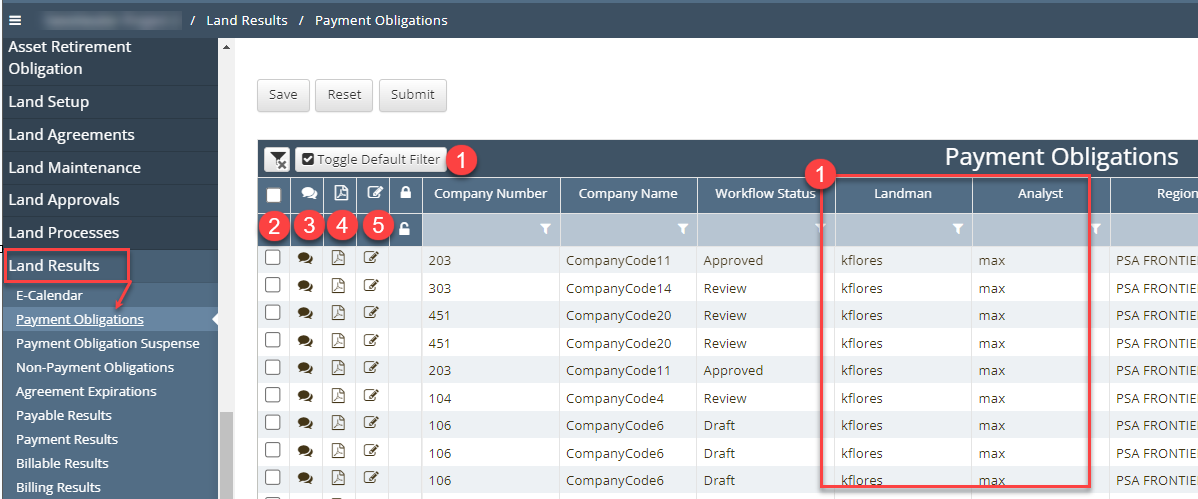
Toggle Default Filter
System filters exist on the grid to assist in returning current and relevant data.
Toggle Default Filter button is set to True (checked) by default
When the Toggle Default Filter is checked, only obligation results where the login user is either the assigned Landman or Analyst on the source agreement for the obligation are displayed
This is meant to limit the default view for the user to his/her specific work
Click to uncheck the Toggle Default Filter to view all Payment Obligation records
Check Box
Check this box and click the Submit button to submit an obligation result(s) to the approval process
Comment bubble
Click this icon to either view past comments on the obligation or enter a new comment
PDF icon
Click this icon to view a high-level summary of the agreement and to print the Agreement Data Sheet for the source agreement
Paper icon
Click this icon to open the source agreement record and view the source obligation detail record
Reconciliation
This process is used to generate Payable, Payment, Billable, and Billing results. These results are displayed on the Payable Results, Payment Results, Billable Results and Billing Results pages listed under the Land Results menu in the navigation bar.
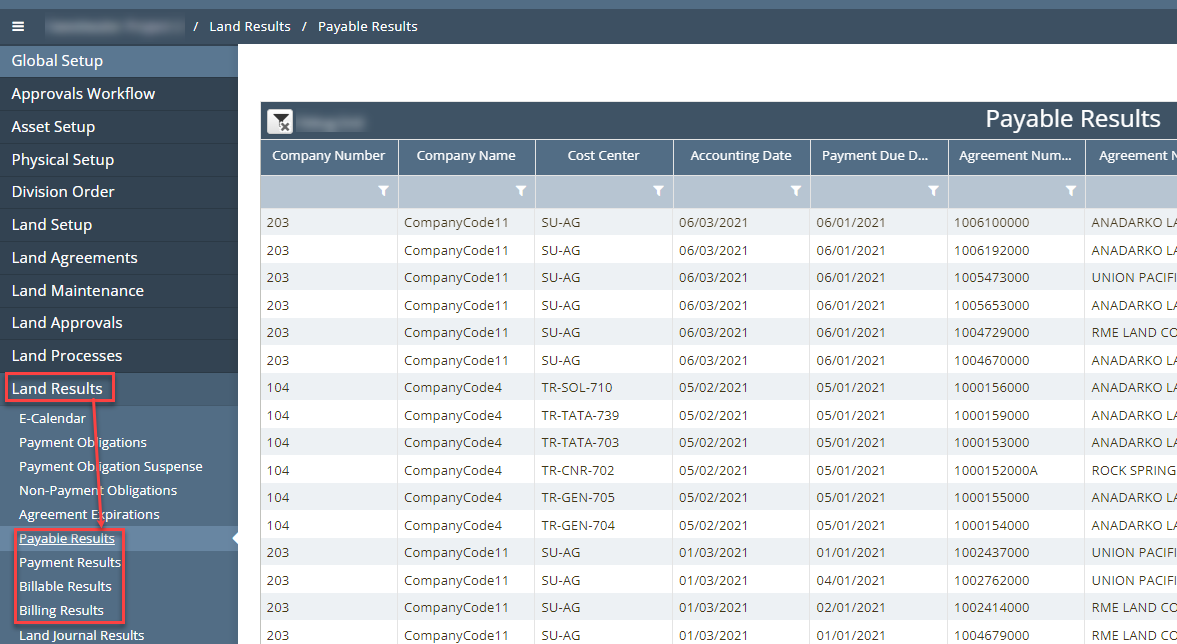
Payable Results
Payable Results are generated based on the following criteria and exist 1:1 with the source payment obligation result.
The Payment Obligation result is approved
The Payment Obligation result has a recommendation of Pay (not Hold or Do Not Pay)
The Payment Obligation result Due Date is nested/effective between the Batch Process Control First Due Date and Last Due Date
Payment Results
Payment Results represent a summarized view of Payable Results based on Company, Accounting Date, Payment Due Date, and Payee.
Billable Results
Billable Results are generated from the Payable Results where the source Payment Obligation Result for the said Payable Result has the Bill flag marked true.
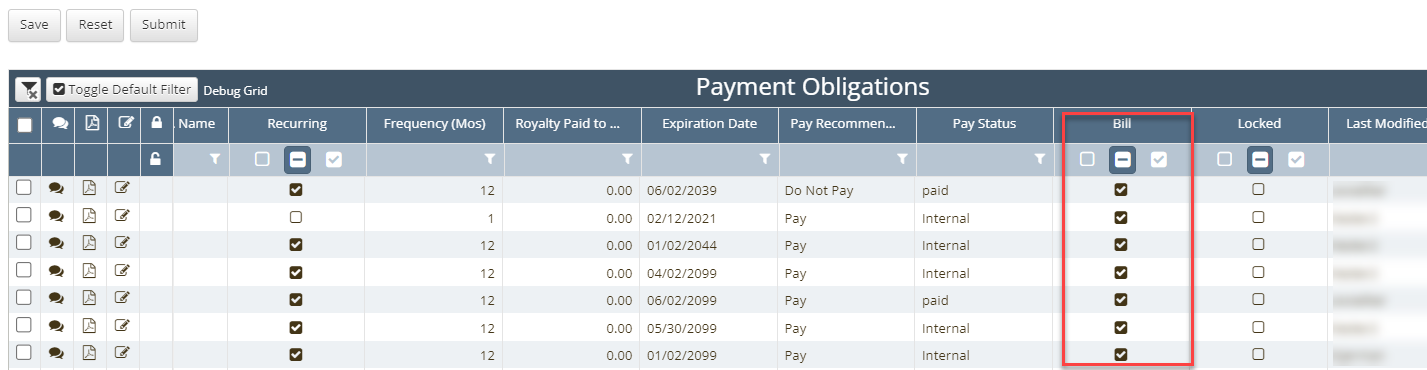
The Bill flag is marked true when the source Payment Obligation on the Agreement/Tract/Subtract has at least 1 billing participant in the Obligation Rates grid
Billing Results
Billing Results represent a summarized view of Billable Results based on Company, Accounting Date, Payment Due Date, and Payee.
Land Journal Interface
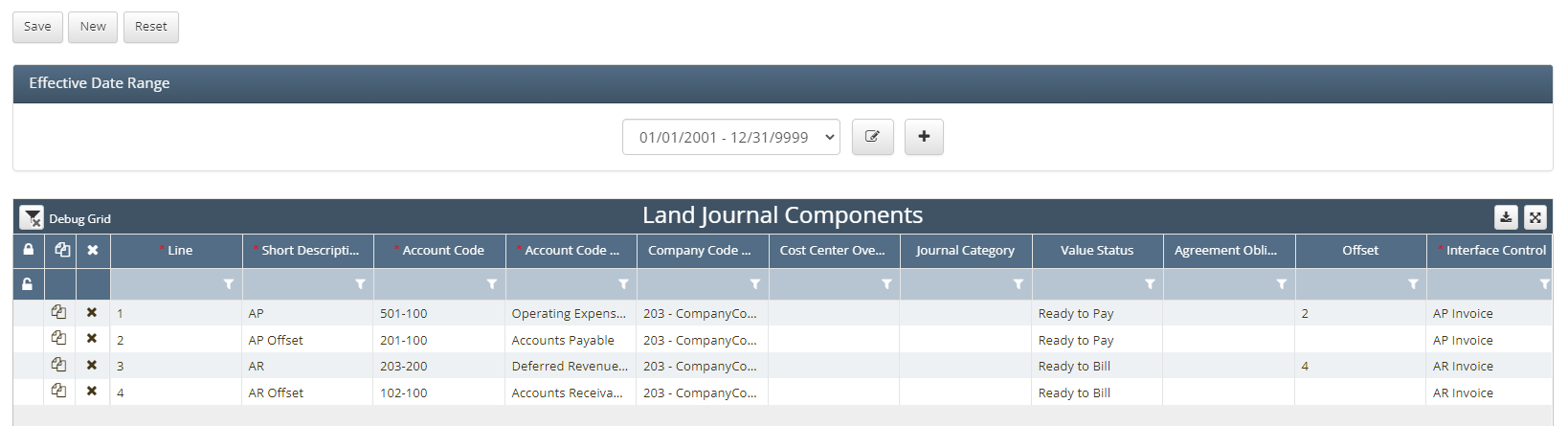
This process depends upon the setup under Land Setup / Journal Components. It is used to generate Land Journal Results which represent the Journal Results that will ultimately be created in the Financials module when the final process (Payment Generation) listed in the Batch Processes section of the Land Processes / Land Process Control page is executed.
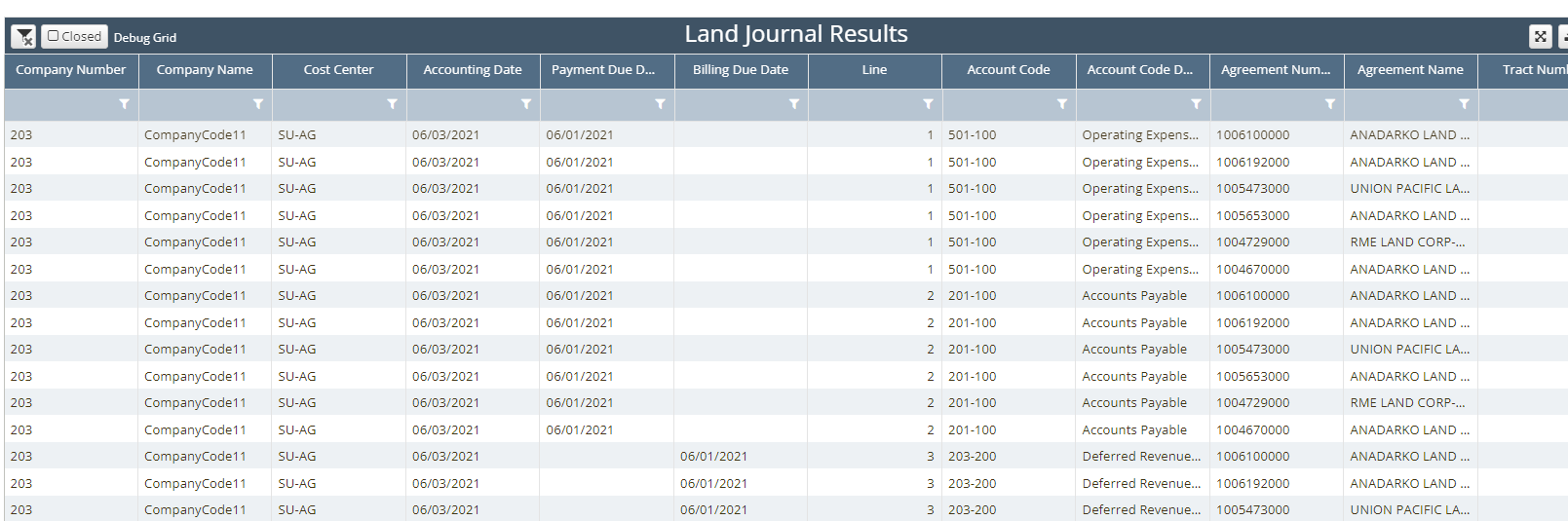
Land Journal Results
Users can confirm the potential journal results on the Land Results / Land Journal Results page. If errors exist, Clear Land can be run, updates can be made to the Land Journal Components and then the Land Journal Interface can be rerun before the Journal Results are created in Financials.
To enable this process, the Financial Integrations feature config must be enabled as referenced earlier in the document. When Land Journal Interface is run, it creates records in both the financial_integration and the land_financials database tables. The land_financials and financial_integration database tables are used to join the data in the land and financials database tables.
Payment Generation
Payment Generation is the last process in the Batch Process group. Once the Payment Generation process has been executed, the processes are locked and no other process can be rerun.
This process also updates the status fields in the Land Results grids from Ready to Pay to Paid.
How does this concept impact/feed other areas in the application?
The Payment Obligation Land Process has a direct correlation with the Financials Module via the Land Journal Interface and Payment Generation processes described earlier in the document.
Frequently Asked Client Questions