
Obligations
What is a Land Obligation?
An obligations is a clause within a lease that outlines the contractual agreement between the lessee and lessor that is either a required payment or is considered a non-payment obligation due to specific circumstances within the life of the well.
Why would a client use Obligations
Obligations are similar to provisions as they are the terms within the lease that outline the contractual agreement within the lease itself. They can be described as Payment Obligations or Non-Payment Obligations. By abiding by these clauses, both the lessee and lessor can prevent any form of misunderstandings or legal issues from occurring. By utilizing the obligations tab in the land module, you can quickly identify any rules that are to be followed, provisions to be paid and what the lessee has to abide by during the life of the lease. If these rules aren't followed or abided by, the lease can be released and be null and void.
What Configurations apply when using XYZ
XYZ: true
XYZ: upstream
Include any explanation needed for these configs, if not needed, you can remove this section
How Add an Obligation to a Land Agreement
Below are the steps to adding a provision to a land agreement. Please review the sections below on setting up the provision template which is a pre-requisite prior to adding provisions.
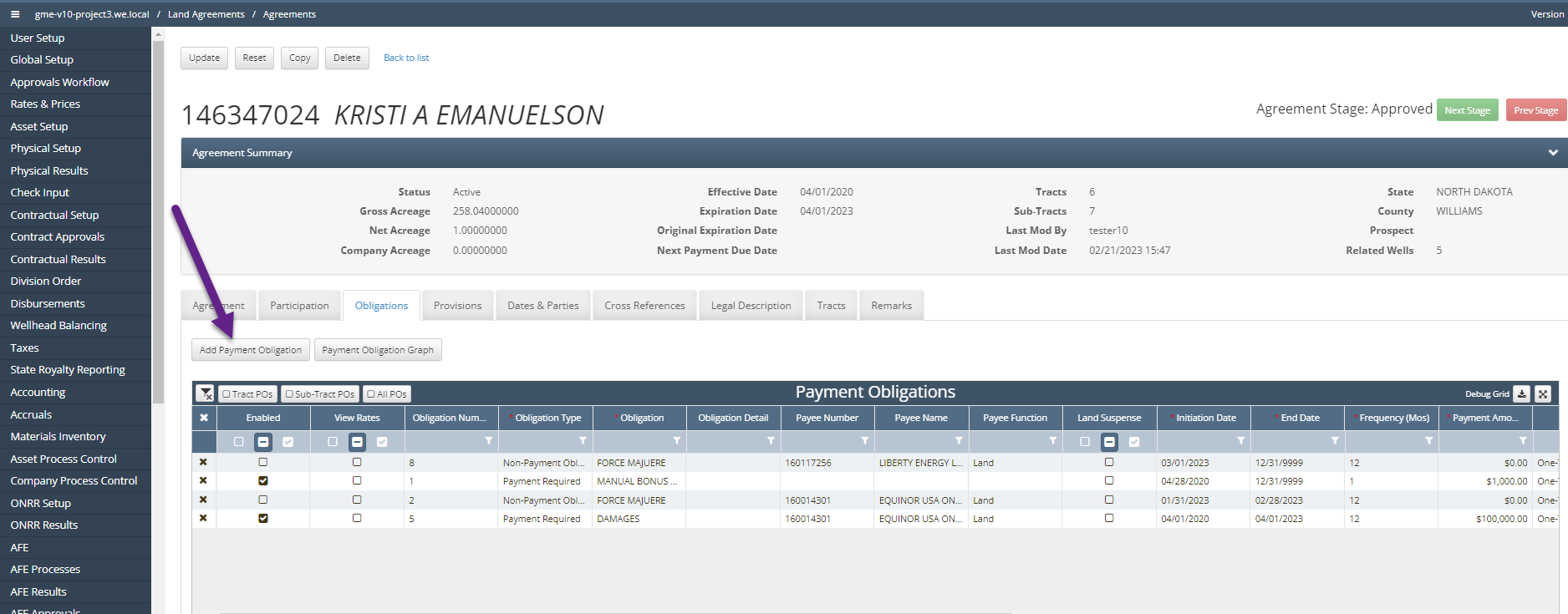
Navigate to Land Agreements / Agreements.
Click into an Active Agreement.
Toggle to the Obligations tab. If the Obligations tab is missing, toggle back to Agreement Set Up to enable this tab to appear.
Select Add Payment Obligation which adds a blank line item under the Payment Obligations grid.
Fill in the required fields and optional fields as necessary.
Select Update to save the Obligation.
Obligation Types
Obligation Types is an external code table that controls the variety of payment or non-payment obligations that can be selected/added from the Obligations Details and the Obligations Types code table.
Obligation Code Tables
Obligations are set up within three code tables: Agreement Obligations, Obligation Details and Obligation Types.
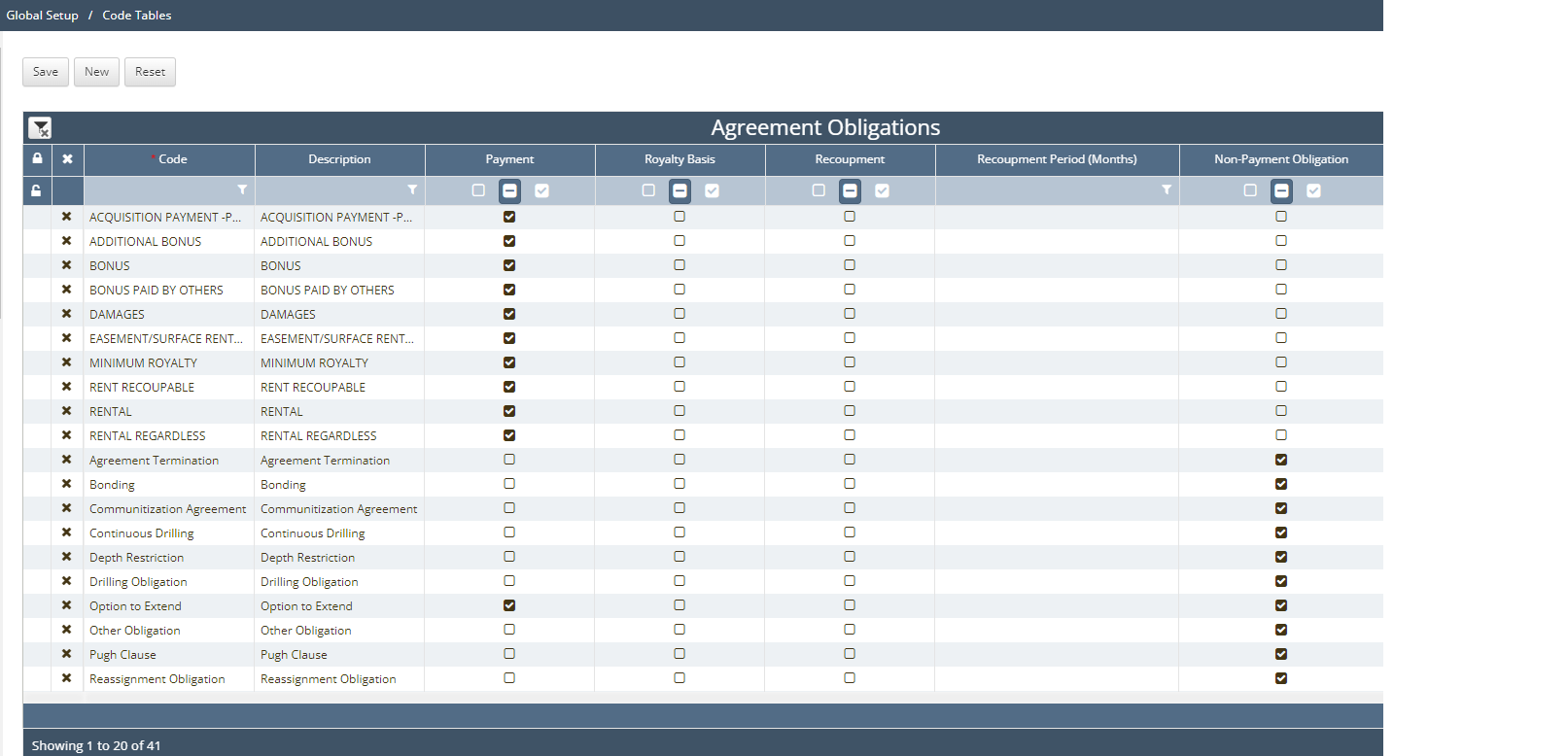
A. Agreement Obligations
Code: this value determines the name of the Obligation; can be shortened or abbreviated
Description: this optional field describes the Obligation
Payment: this optional field is a check box that gives the option of it being a payment obligation or not.
Royalty Basis: this optional field is a check box that gives the option of the obligation being based on it’s royalty such as a Take-In-Kind (TIK) obligation.
Recoupment: this optional field is a check box that gives the option of the obligation having the ability of recoupment of costs on a monthly time period in case of bankruptcy of the operator or payor of royalties - see article below explaining this*
Recoupment Period (Months): this free form text box allows the user to add the time period within a month sequence of how often the recoupment will be utilized or reviewed.
Non-Payment Obligation: this optional field is a check box that gives the option for the obligation to be a Non-Payment obligation or not.
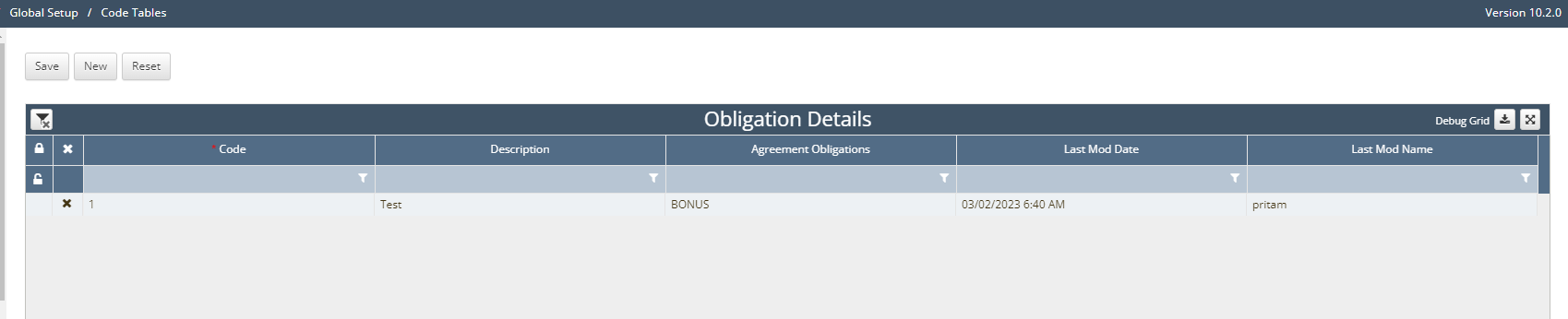
B. Obligations Details code table defines what obligations lie within the agreement. For example, Rental Regardless Payment.
Below are the fields of this code table and their significance:
Code: this value determines the title of that field under the Obligation grid
Description: optional field for notes/commentary of this obligation type with
Agreement Obligations: determines what type of field obligation will be under the Payment Obligations grid as a text that will be a drop-down value that will appear in the grid columns under the agreement. This will need to be set up under Agreement Obligations (see A.)
C. Obligation Types code table can be used to define payment obligations versus non-payment obligations or the actual obligation the client wishes to add.
Below are the fields of this code table and their significance:
Code: this value determines the title of that field under the Obligation grid
Description: optional field for notes/commentary of this obligation type.
