
Liquid Trans Setup / Volume to Volume Conversions
What are Volume to Volume Conversions
Volume to Volume Conversions are used in the system to define a conversion of one volumetric unit to another. Typically in Liquid Transportation we would see this setup to convert barrels to gallons or vice versa.
Why would a client use Volume to Volume Conversions
A client would this if they only entered data in one volumetric unit but wanted to see data in another unit as well. For example, if they entered run ticket data in barrels but didn't have data in gallons, they could use this setup piece to have the system include the data in units of gallons using the conversion factor they set.
Note: 1 barrel = 42 gallons
How to setup Volume to Volume Conversions in the system
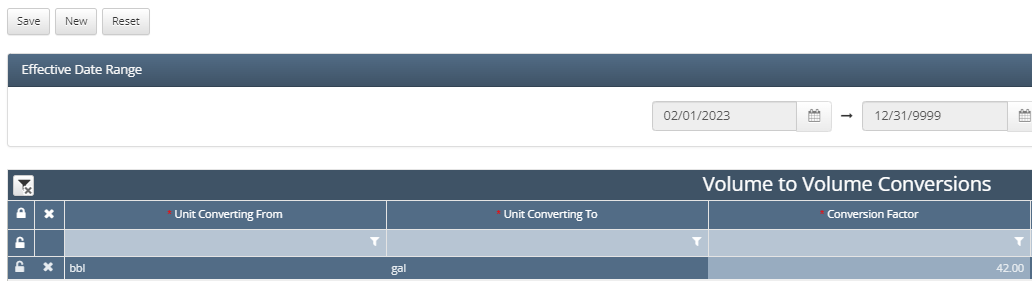
Navigate to Liquid Trans Setup / Volume to Volume Conversions
Select New in the top left hand corner
From there select the unit you are converting from in the drop down that appears
Select the unit you are converting to
Then enter the conversion factor to convert unit from to unit to
Click Save
How does this concept impact/feed other areas in the application?
This feeds into other parts of the application as it would generate inventory results for both the unit that is entered as well as the unit that is being converted to. In the example above, results would be available in both barrels and gallons due to this volumetric conversion setup.