
Liquid Trans Setup / Transport PDAs
What are Transport PDAs
Transports Predetermined Allocations (PDAs) are used to force a specific type of allocation at a given location and effectively override the default nomination-based allocation approach. Pre-determined allocation can be setup either at a meter level or at a location (meter group) level.
Why would a client use Transport PDAs
A client would use this functionality if they needed to setup a type of allocation at the meter or location level to override the default nomination based allocation approach.
How to setup Transport PDAs in the system
As the logic for each of these screens is similar, only the receipt PDA will be shown as an example below. When navigating to the PDA screen, the list of existing PDAs for the asset will be available:
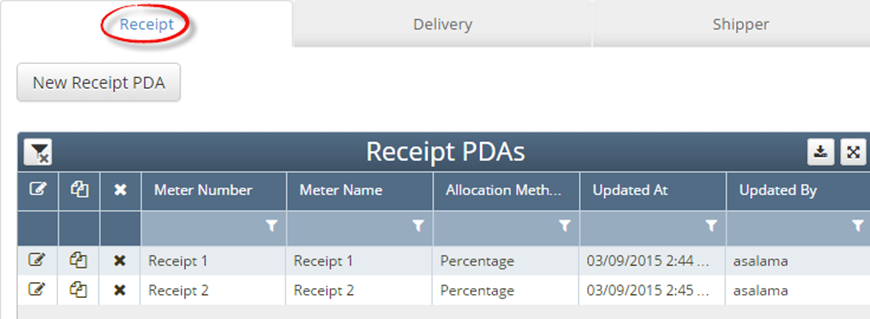
The edit screen appears when editing a specific existing PDA or to create a new PDA:
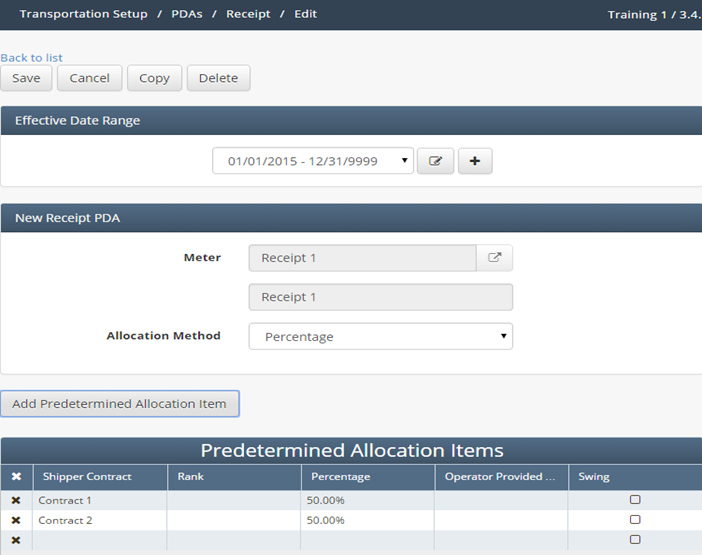
Meter: a receipt meter to which the PDA will apply can be selected using the meter picker. For a Receipt PDA, “delivery” meter types will not be available to select (and vice versa on the “Delivery PDA” screen).
Receipt PDA properties / Allocation Method: drop down field indicating which PDA options are available. The selections and associated grid logic below are as follows:
Operator Provided Value (OPV):
The operator will provide the allocated volumes for the intended shippers. The following are required:
Shipper Contract
OPV
Other fields should not allowed upon save
Note that if the actual measured volume does NOT equal the sum of OPVs, the actual measured volume will be allocated pro rata based on the OPV values indicated (see example below):
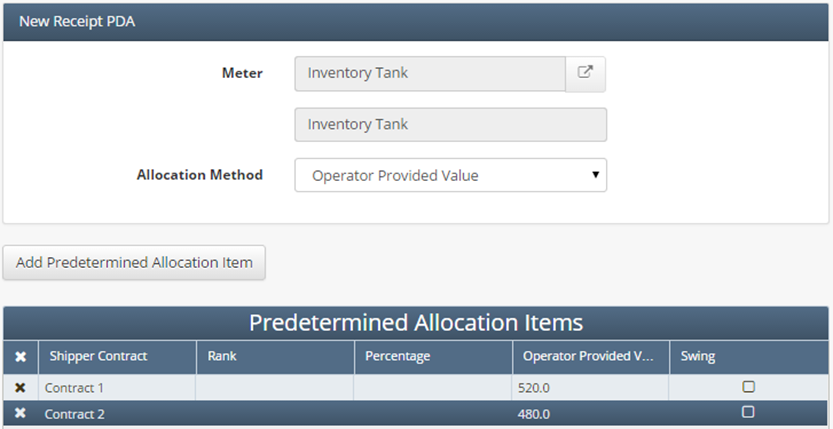
OPV Example:
For this example the Total (Measured) Volume is 5,000, as mentioned above if th measured volume does not equal the sum of the OPVs, the actual measured volume will be allocated pro rata (define this later) based on each shippers OPV values indicated below:
Total Volume: | 5,000 |
|
| Operator Provided Volume | Allocated Volume |
Shipper 1 | 125 | 250 |
Shipper 2 | 650 | 1,300 |
Shipper 3 | 1,000 | 2,000 |
Shipper 4 | 100 | 200 |
Shipper 5 | 625 | 1,250 |
Totals | 2,500 | 5,000 |
Here it can be seen that the total measured volume was 5,000 but the OPV total volume was 2500, in this case the allocated volume will be equal to 5,000 and be allocated based on each shippers throughput. Since 5,000 is double the sum of the OPV (2500), each shippers allocated volume would be double what the OPV was for that shipper.
Percentage:
This PDA allocation method allows the user to define specific percentages of the meter’s volume to be applied to each indicated shipper.
The following fields are required:
Shipper Contract
Percentage
Percentages must sum to 100%
Other fields should not be allowed upon save

Percentage Example:
For this example the total measured volume will be 5,000 and the table below shows what percentage each shipper should be allocated of that 5,000:
Total Volume: | 5,000 |
|
| Percentage | Allocated Volume |
Shipper 1 | 5.0% | 250 |
Shipper 2 | 26.0% | 1,300 |
Shipper 3 | 40.0% | 2,000 |
Shipper 4 | 4.0% | 200 |
Shipper 5 | 25.0% | 1,250 |
Total | 100% | 5,000 |
Here it can be seen that each shipper percentage is detailed and based on total measured volume, they are allocated according to what their percentage is of that total measured volume.
Pro-rata (based on nom):
This method will use nominated volumes for the location to determine a pro-rata allocation of volume. This is also the default methodology for allocation in transportation assets.
The nominated volume gets adjusted for each shipper on a pro-rata basis by taking the percentage of the total nominated volume and applying it to the total transport volume.
Pro rata (based on nom) Example:
In this example that total measured volume is 7,500 and total nominated volume is 5,000. The shippers will be allocated part of the total measured volume based on their percentage of total nominated volume:
Total Volume: | 7,500 |
|
| Nominated Volume | Actual Volume |
Shipper 1 | 250 | 375 |
Shipper 2 | 1,300 | 1950 |
Shipper 3 | 2,000 | 3000 |
Shipper 4 | 200 | 300 |
Shipper 5 | 1,250 | 1875 |
Total | 5,000 | 7,500 |
Operational Balancing Agreement (OBA):
If an OBA is in place then this option ca be used. When it is selected, shippers at the point will be allocated their exact nominated/confirmed/scheduled volume, and any differences versus the actual flow will be allocated to a swing contract for the operator at that meter. As such, the following is required in the grid:
Shipper Contract
Swing: will be “Y” for one party only, and that party will absorb any difference between actuals and nominated/scheduled quantities as their OBA imbalance
Other fields show be not be allowed upon save
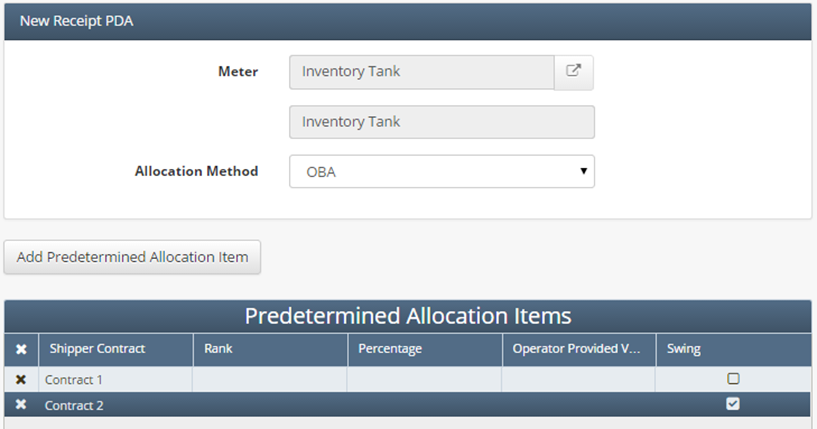
OBA Example:
In this example there is a total measured volume of 5000 and the shipper has a nominated volume of 4000. With the OBA allocation, the contract that is set to have swing marked as true will be allocated any differences between the non-swing contracts nominated volume and measured volume.
Total Volume: | 5000 |
| |
| Nominated Volume | Actual Volume | Swing |
Shipper 1 | 4000 | 4000 | N |
Shipper 2 | 0 | 1000 | Y |
As seem on the table, Shipper 1’s nominated volume is set to 4000 and total measured volume is 5,000. In this case they would be allocated 4,000 as stated by the OBA and the difference of 1,000 would be allocated to the swing contract.
Rank
This PDA method allows the user to rank priorities for allocation, where the lower the number (better the rank) will be prioritized versus the higher numbers (lower rank). When this is selected, the actual volumes will be allocated based on priority, with the #1 shipper getting their full nominated quantity, then #2, and so on until there is no further volume to allocate. The following are required:
Shipper contract
Rank
Only the highest number (lowest rank) can be indicated more than once. What this means is that any remaining volume after the higher priority contracts have received their fair share will be allocated pro-rata among the remaining contracts based on their nominated volumes. So if I have 3 contracts ranked as follows:
K1: rank = 1
K2: rank = 2
K3: rank = 2
Rank Example:
For this example, assume total measured volume is 5000 bbl.
Total Volume: | 5000 |
| Rank |
| Nominated Volume | Actual Volume | |
Shipper 1 | 4000 | 4000 | 1 |
Shipper 2 | 1500 | 750 | 2 |
Shipper 3 | 500 | 250 | 2 |
In this case Shipper 1 that has a rank of 1 is allocated is full nominated volume of 4,000, this leaves 1000 left for the other shippers which are then given the same rank. The 1,000 left over is then distributed on a pro-rata basis to the other shippers since they share the same rank.
Swing
This PDA allocation method is similar to the OBA scenario, the swing OBA method allows one contract to be specified, which will absorb any length or shortness of the actual volume against nominations. The required fields are as follows:
Shipper Contract
Swing
Only one swing contract can have a “Check Box” for the PDA
How does this concept impact/feed other areas in the application?
Transport PDAs feed into the various results screens within Liquid Transportation. Depending on what PDA method is selected and within that PDA the exact specifications that are outline determines how the system will allocate volume based on nominations. This will drive what is seen in shipper allocations & book inventory transaction result screens.