
Liquid Trans Setup / Inventory Adjustments
What are Inventory Adjustments
Inventory adjustments can be used to enter beginning inventory into the system, as well as make any adjustments to the month’s inventory balances
Why would a client use Inventory Adjustments
A client would use Inventory Adjustments if they need to setup beginning inventory in the system. They would also use it if they need to make any adjustments to a given days inventory balance.
How to setup Inventory Adjustments in the system
Inventory Adjustments can either be entered manually by adding a new inventory adjustment line or they can be uploaded using the inventory adjustment template
Navigate to Liquid Trans Setup / Inventory Adjustments
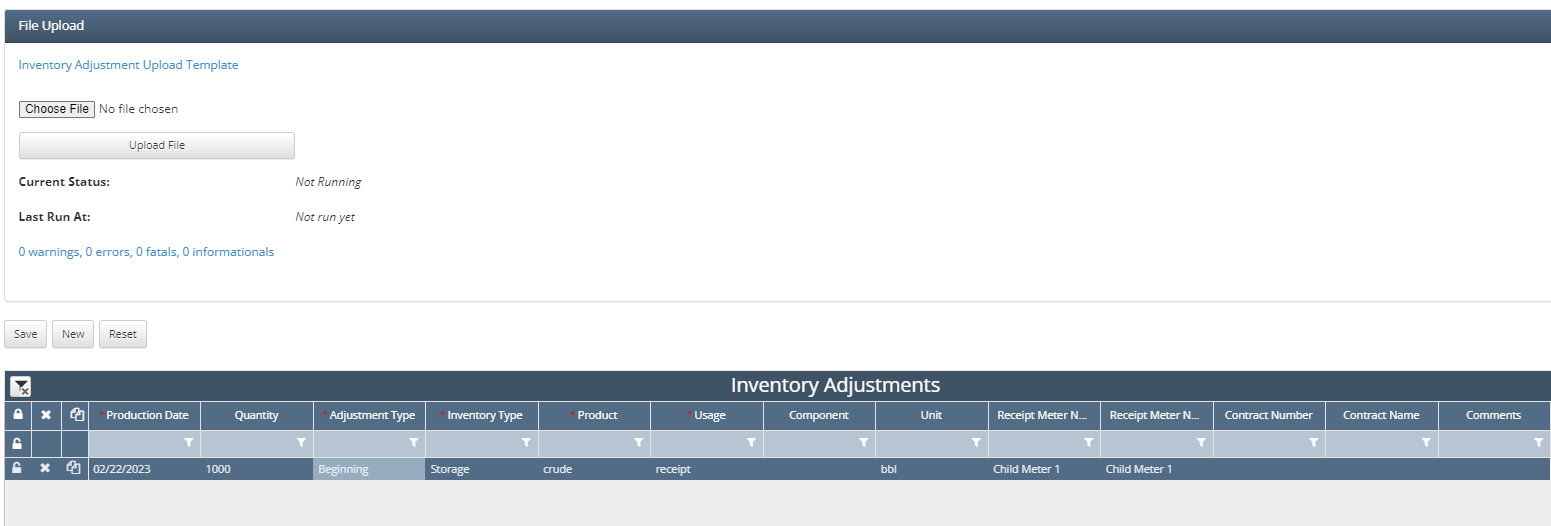
Next click ‘New’ to add a new line item, from there the following fields need to be populated
Production Date: The corresponding date for the inventory adjustment
Quantity: The quantity for the adjustment
Adjustment Type: Beginning or Adjustment
Inventory Type:
Storage
Allowance
Linefill
Product: The product that is associated with this inventory adjustment
Usage: The usage for this inventory adjustment, typically receipt
Unit: The unit of measure that the quantity volume is in
Receipt Meter Number: The corresponding meter
Contract Number: The corresponding contract
Alternatively, the user can download the template and populate it in a similar fashion that they would have manually explained above


If an inventory adjustment is beginning inventory for current production month, the user must create the adjustment using last month’s production month so the inventory will be pulled in as beginning inventory of the current month.
How does this concept impact/feed other areas in the application?
Inventory Adjustments will directly impact Inventory results screens such as Book Inventory Transactions depending on what type of adjustment was setup. Since this can also impact the gain/loss that is calculated if there are any fees that are setup to settle on gain/loss this could also impact Valuation Results.