
Liquid Trans Setup / Gathering Cycles
What are Gathering Cycles
Gathering Cycles are used to define the rules around when a shipper can nominate and make nomination changes. This defines, for a given day or time period, the rules for External CAW (Customer Activity Website) users. In the system, cycles are ignored for internal users. Internal users can update nominations for nomination days in the past, on a timely cycle, if desired.
Why would a client use Gathering Cycles
Gathering Cycles are required to be setup in order for a client to use nominations. A client would setup this up in a given asset if they wished to use the nomination functionality (may be required whether they plan to use them or not, need to confirm).
How to setup Gathering Cycles in the system
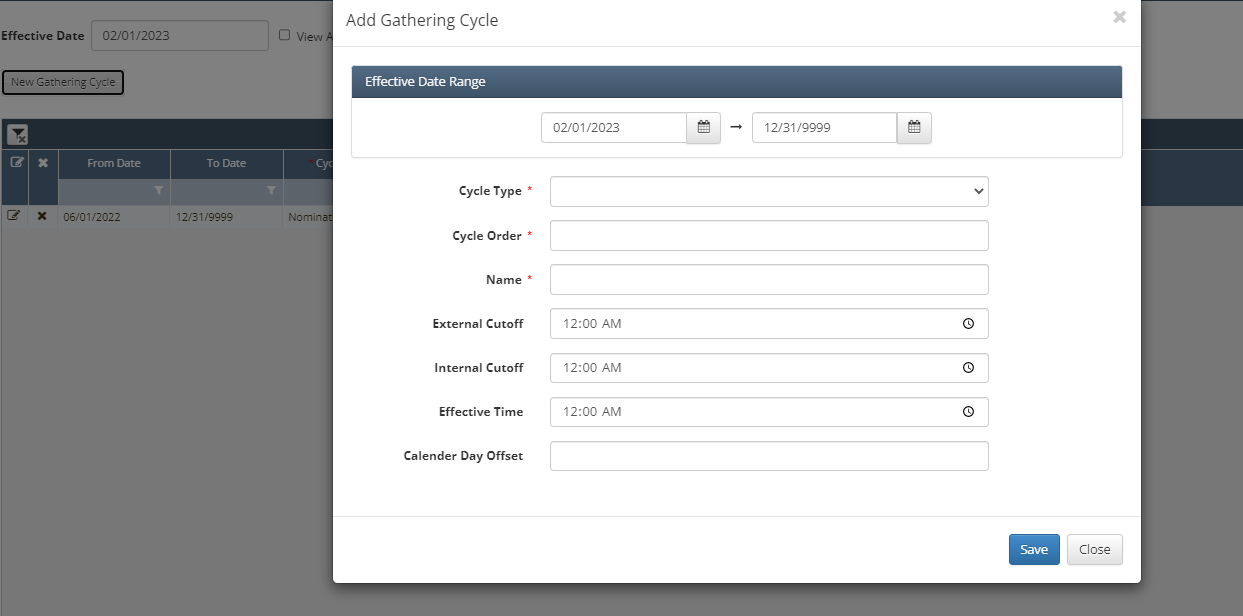
Navigate to Liquid Trans Setup
Select New Gathering Cycle
From there setup the applicable effective data range
Next Select Nomination or Confirmation from the Cycle Type drop down
Nomination:
Confirmation:
Enter Cycle Order
Populate Name
Set the External & Internal Cutoff Times
Enter the Effective Time
Click Save once all necessary data has been entered
How does this concept impact/feed other areas in the application?
This feeds into nominations and CAW functionality as it defines the rules around when a shipper can nominate and make nomination changes.