
Fixed Asset Staging
What is Fixed Asset Staging
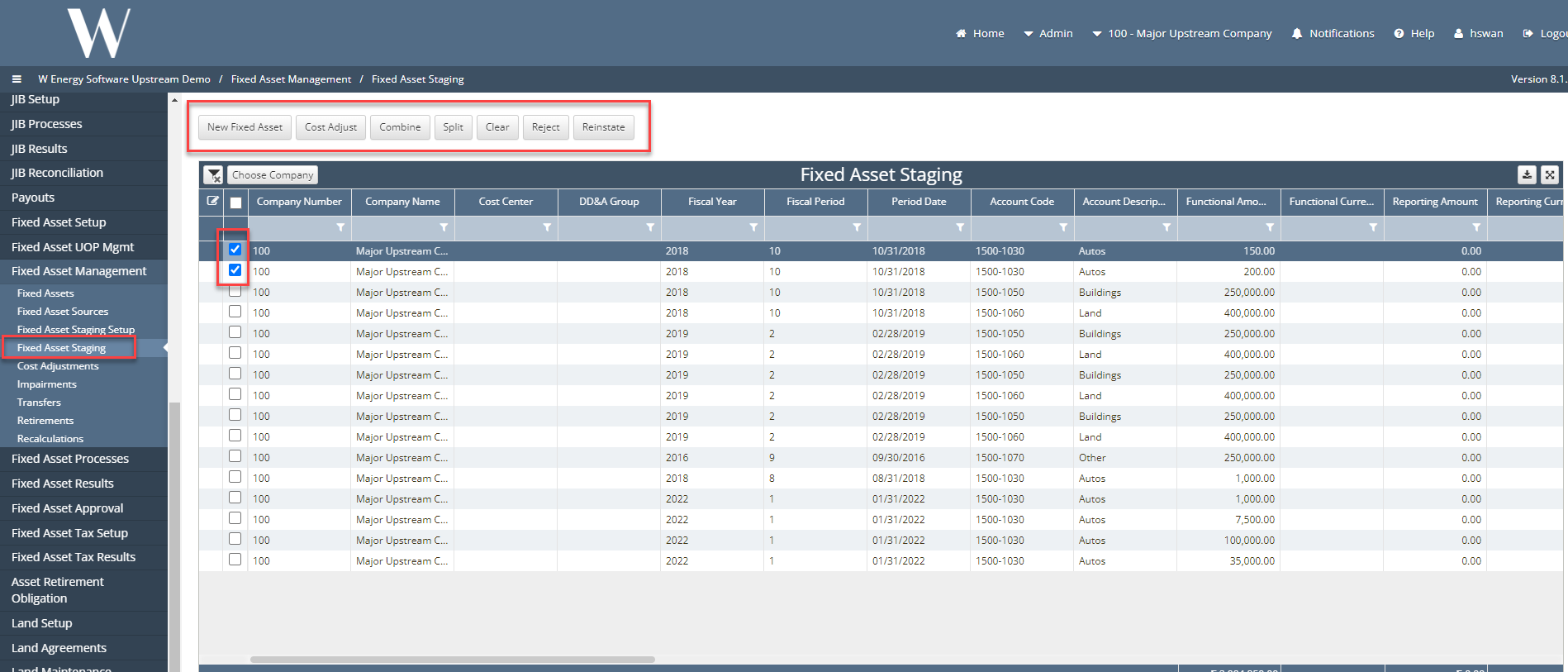
This screen is where the transactions that have the automatic handling checked in the fixed asset staging setup will appear. This screen will allow you to click on a single or multiple transaction where you can then decide if you want to create a new fixed asset, make a cost adjustment to existing assets, combine multiple assets, split a single asset into multiple assets, reject an asset, reinstate an existing asset, or clear an asset.
Why would a client use Fixed Asset Staging
Some examples of why clients may use fixed asset staging are below.
How to setup Fixed Asset Staging in the system
The following buttons are functions of the screen:
New Asset -
Cost adjust
Ex: An increase in the value of inventory which means that there will need to be a record made noting the increase amount of cost of goods sold when the inventory is eventually sold.
Combine
Ex: If multiple assets – If you have posted acquisition costs and depreciation for the same fixed asset to be moved, the values could be combined to make a single fixed asset.
Split a single asset into multiple –
Ex: Takes 25% of acquisitions costs and moves it to a second fixed asset. Then, takes 45% of the acquisitions cost to move to third fixed asset. That means 30% remains on the original asset.
Can only create new assets.
Ex: Clear – If two lines offset each other, an entry is booked and then reversed, both lines show up in staging, but you don’t really need to add them to anything select both lines and click on clear
Ex: Reject – If rejected, it will ask for a reason why user is rejecting. Then staging row status will turn to a rejected status.
Reinstate - If reinstated, the rejected record that was checked for a reinstatement will turn its status back to draft.
Note:
Fixed Asset Split – If the cost center does not populate and is greyed out then that means the user did not populate the cost center in their Journal Entry.
Fixed Asset cost adjustment – The Fixed Asset list will only show assets that are on the same cost center and same asset account as the category.