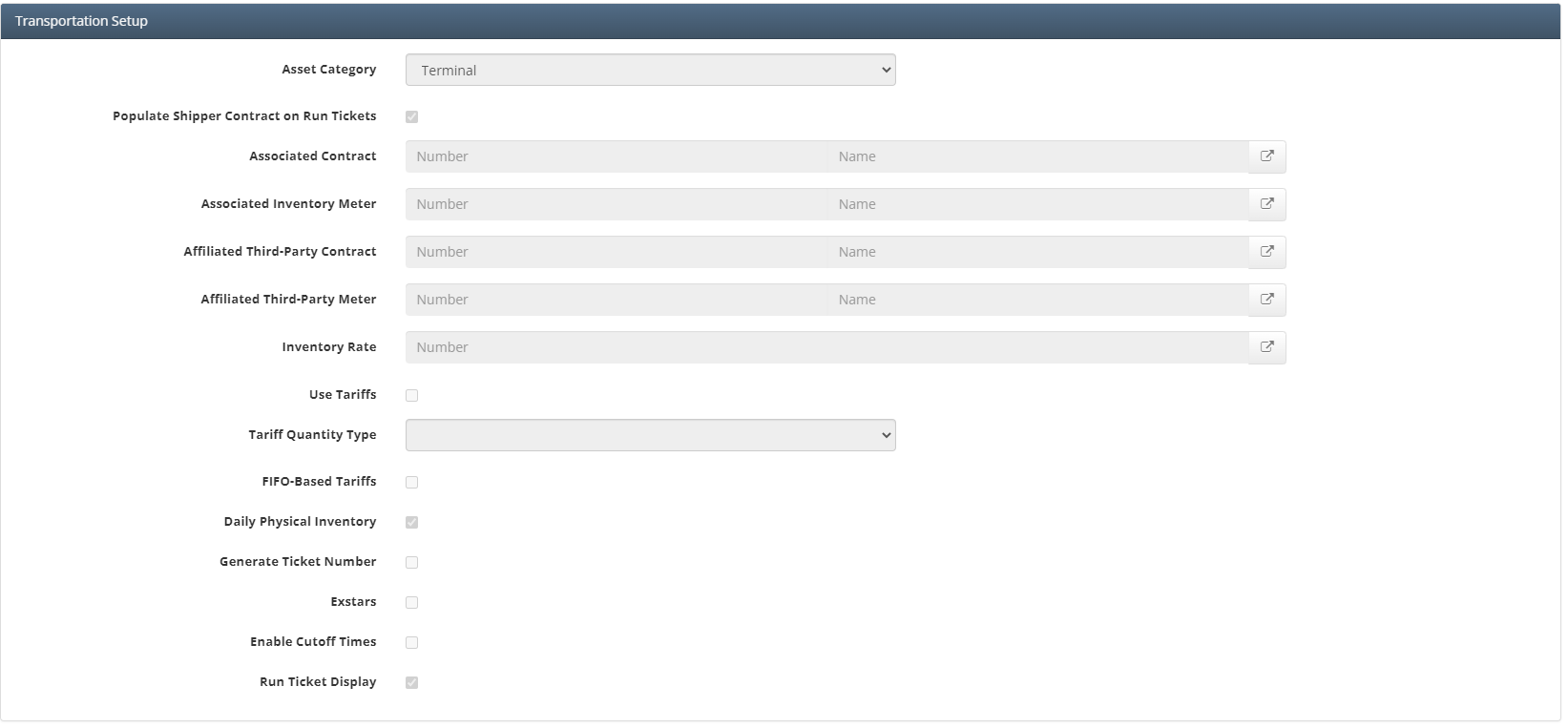
Transportation Setup is a setup screen where you configure what type of asset this is going to be, Terminal or Transportation. This screen is also used to setup associated contracts and inventory meters. This is also where the user can define run ticket units
Why would a client use Transportation Setup
A client would use this screen in order to define whether the asset is a terminal or transportation asset. They would also use this to setup what units they want to be viewed on the run ticket grid
How to setup Transportation Setup in the system
Asset Category
This where the user can select Transportation if it is a Transportation (Pipeline) asset or Terminal if it is a Terminal asset.
Populate Shipper Contract on Run Tickets
Checking this box allows the user to upload volumes with shipper number and then the system will tie that entry to the corresponding contract. Not all clients will be able to pull contract number into their volume uploads so this allows them to populate only shipper number
Associated Contract
This is used as a fall back when trying to assign inventory to a contract. If it goes through a process and a volume isn't assigned to a contract, then the system will assign it to the Associated contract
Associate Inventory Meter
This is used as a fall back when trying to assign inventory to a meter. If it goes through the process and a volume isn't assigned to a meter then the system will assign it to the Associated Inventory Meter. For transportation assets that only have one receipt and delivery point it is typical to populate this field with the receipt meter.
Affiliated Third-Party Contract
Is used if a client wants to roll up part of inventory for all contracts onto a single contract. We typically see this happen for allowance & gain/loss.
Affiliated Third-Party Meter
This is used to assign one part of inventory for all contracts onto a single meters. This meter will most likely be attached to the Affiliated Third-Party Contract. Would be used to roll up all allowance or gain/loss onto one meter.
Inventory Rate
Is the rate that will be charged on inventory change. Very few test cases of this actually being used by a client.
Use Tariffs
Check this box if the asset will be using tariffs. Most Liquid Transportation assets use tariffs over fees/rates
Tariff Quantity Type
Gross Quantity or Net Quantity. Will be based on client setup.
FIFO-Based (First In First Out) Tariffs
Select this check box if the asset will have tariffs based on First In First Out invoicing logic
Daily Physical Inventory
Check this box if the asset will be using the process ‘Daily Transport Allocate
Generate Ticket Number
Check this box if you wish for the system to generate ticket number rather than user defined
Exstars
Check this box if the asset will be reporting to Exstars
Enable Cutoff Times
This enables cut off times which can be used adjust what day a ticket will have its effective from set to based on how the cut off times are setup.
Run Ticket Display
Checking this box allows the user to customize what the run ticket screen will look like. Upon checking this after clicking update it will bring up a grid at the bottom of the Transportation Setup screen.
How to setup Run Ticket Units in the system
This area is where the user can define what units are available on the run ticket grid, it also allows the user to define how they are displayed in the column header. Typically for Liquid Transportation Assets we will use both bbl (Barrels) & gal (Gallons).
The units that are setup here are what will show up on the run ticket screen under physical setup. The column header sets what the header will be on the run ticket screen
How does this concept impact/feed other areas in the application?
Depending on what is configured here this screen can feed into multiple other areas of the application. If an associated inventory meter is populated then all inventory will be held on that meter. The units that are setup define what units will be available on the run ticket screen.
Frequently Asked Client Questions
JavaScript errors detected
Please note, these errors can depend on your browser setup.
If this problem persists, please contact our support.