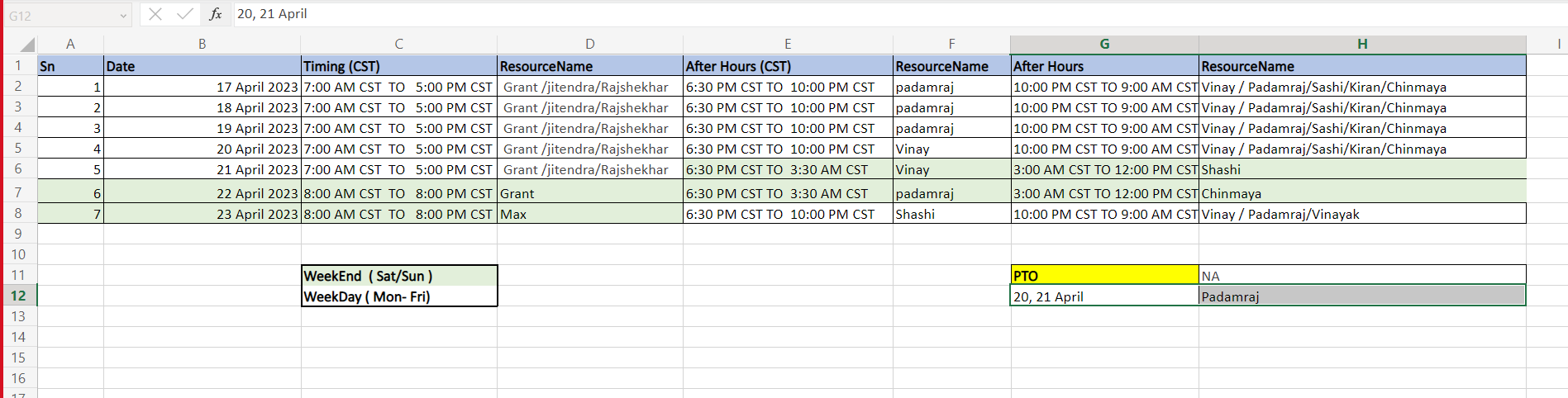
How to verify who is On-Call
Engineering On-Call
Who is on call - https://wenergysoftware.app.opsgenie.com/schedule/whoIsOnCall
On-Call Engineering Primary - https://wenergysoftware.app.opsgenie.com/settings/schedule/detail/4692f465-1f12-4540-b0d7-9f8f3020c1a0
On-Call Engineering Secondary - https://wenergysoftware.app.opsgenie.com/settings/schedule/detail/ad807415-9d54-4a83-a9af-88c469a95a96
You could also follow below steps (from Support On-Call) to look for the names from Engineer On-Call for the day.
The contact information for each on-call engineer can be obtained from Slack profile
Support On-Call
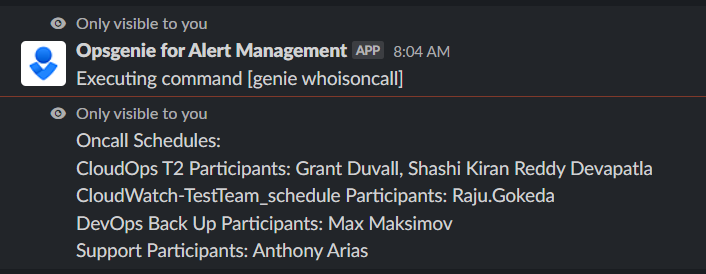
In any Slack chat type below, you will be able to see who is on call for support:
/genie whoisoncall
You will receive the following, please ignore the CloudOps lines:
Cloudops On-Call
Go to the CloudOps Support Chat and Click on the roster hyperlink:

The hyper link takes you to the CloudOps On-Call Roster: