
Copy of Division Orders Locked by Discarded/Posted Mass DO Upload
Issue Summary
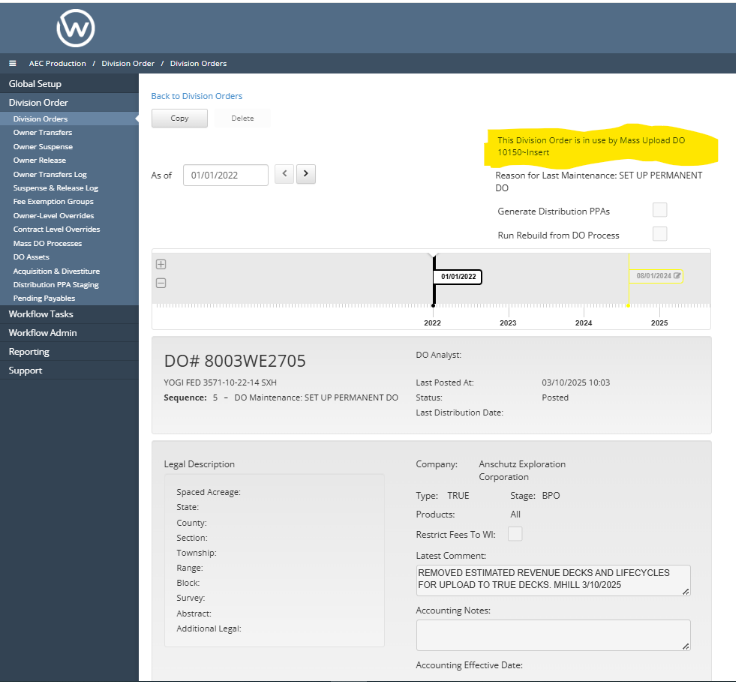
When a Division Order is included in a Mass DO Upload, a lock reason is applied to all Division Orders within the upload to prevent changes while the process is ongoing. Occasionally, certain lock reasons fail to clear even after the process has been either 'Discarded' or 'Posted.' These persistent false lock reasons can prevent users from manually checking out the Division Orders, as they are erroneously locked by a reason that the application should have cleared automatically. This results in unnecessary restrictions and can hinder users from performing necessary actions on the Division Orders. Below is an example screenshot of the error when the client is attempting to checkout the DO.
📘 Instructions to Resolve
Verify the Mass DO upload has been discarded or Posted from the workflow by checking the
workflow_eventstable for the matchingentity_numberandentity_type. Below is an example SQL script to check the latest statuses.
select * from workflow_events where entity_number = '10150'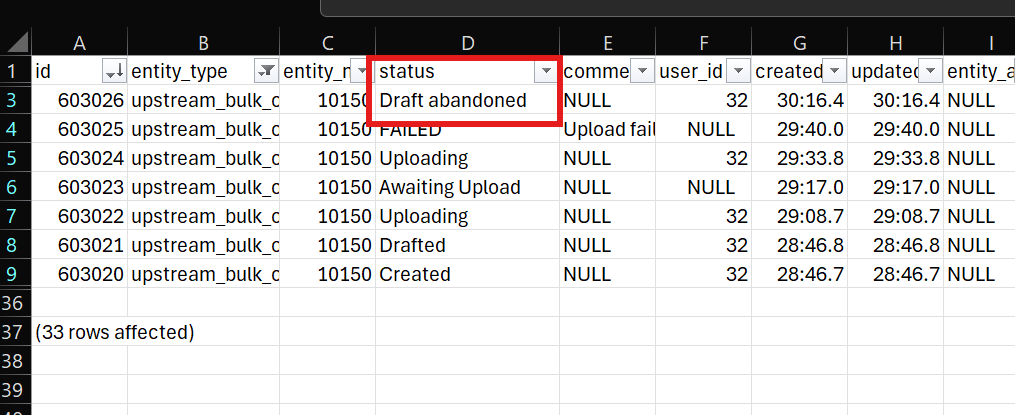
Output from workflow_events

The status must be either 'Draft Abandoned' or 'Posted' to proceed to the next step. This ensures that the lock reasons can be effectively removed. If the latest status is neither 'Draft Abandoned' nor 'Posted', please confirm with the user whether they can submit or discard their Mass DO Upload, if feasible. Proceed to step two (2) ONLY if the status is 'Draft Abandoned' or 'Posted'.
To identify the locked DO
anchor_idcopies currently held by the Upload, please utilize the script provided below. The copies marked with ‘Reserved For Mass Upload DO ####~Insert’ are the ones that are faulty. Execute the SQL command below, ensuring to replace the ‘Where’ clause with the corresponding Mass DO Upload number. The anchor IDs from the output will be utilized in the Rails command to unlock the DOs.
select anchor_id, number, copy_name
from upstream_division_orders where copy_name like '%Mass Upload DO 1015%'
To create Rails commands, utilize the following method:
CopiesUpstreamDivisionOrders.new.delete_do('insert anchor_id'). Begin by copying theanchor_idsfrom the previous query that match the specifiedcopy_name. Then, integrate theseanchor_idsinto the Rails script below to ‘Unlock’ the Division Orders.
CopiesUpstreamDivisionOrders.new.delete_do('4eb4a028-395a-4d16-9256-00f3f897f2c4')
CopiesUpstreamDivisionOrders.new.delete_do('cedc47aa-b41d-4969-96f4-aeaa24fe7d95')
CopiesUpstreamDivisionOrders.new.delete_do('f450483e-a31e-4a70-8600-76e4393b9917')
Please obtain the required client approvals and submit the necessary tickets to DevOps in order to execute the Rails command.
📋 Related Tickets
WESS-14819
WESS-13753
WESS-13027