
Change Control Procedures - Hosted Clients
Overview
Changes to a hosted client’s accounting application environment or data must follow an approval process that includes providing the client with an opportunity to test change in a non-production instance of the application. Note that ‘change’ refers to change to (a) deployment of a code change, (b) configuration changes to the application stored in files on the server, or (c) change to data in the database via direct database access (eg. Executing a SQL script).
Scope
The following is applicable to clients who are currently live on any module of the application or any asset in the application, regardless of whether that change is applicable to that live module/asset or not. A client is “live” when the W Energy Production Environment is the official system of record. Deployments for clients who are not yet live on any module or any asset are at the discretion of the project manager for that client’s implementation.
Processes
Here is the sequence of steps for the approval process for the main application:
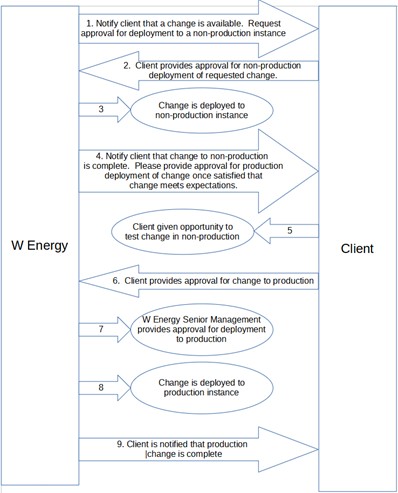
Note that requests for deployment to production instances must be entered as a separate Jira ticket from requests for deployment to non-production instances. Deployments of a requested change to multiple non-production instances may be shared in a single story (eg. deployment to dev, test and staging can be on a single story, but must be separate from the story for deployment to production).
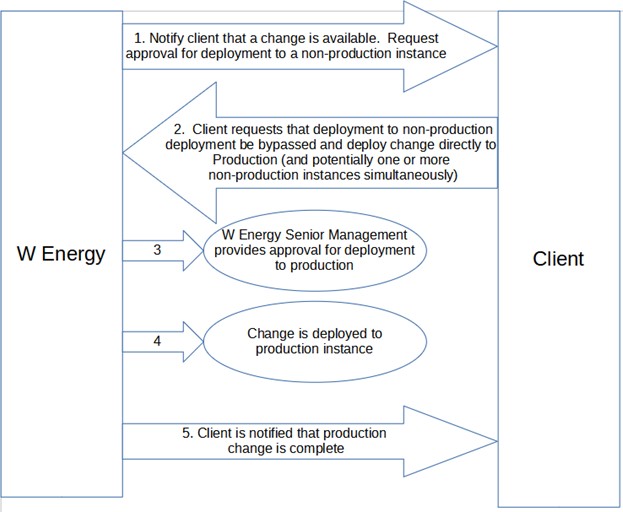
Client has the option to reject approval process to non-non-production and request a deployment straight to prod (or all environments).
Change in which client requests deployment straight to production
Exceptions
In the event of a production down scenario, the DevOps team can perform the tasks below without client or executive approval in order to get the production server back online as soon as possible, if deemed necessary. Note: the changes below still require a Jira ticket to document the task.
Killing jobs/restarting services in production.
Killing database queries in production that are causing the production down.
For multi-tenant solutions (FDC and SLT):
A deploy is made to non-prod environment then QA tests the change.
Once testing is successful, a PROD deploy Jira ticket is created.
The PROD deploy ticket must receive executive approval before it can be completed.
Client approval is required for script deploys to PROD as the change is client-specific to their data.
Client approval is not required for code deploys to PROD.
For Unity branch clients:
Code change tickets pass QA testing.
Product Team Management reviews QA tested tickets and selects which tickets will be included in the next release, effectively providing the internal executive approval.
We communicate to the clients what will be included in the next release and the release deployment schedule.
Deploy ticket is created and executed for the non-prod deploy.
Deploy ticket is created and executed for the PROD deploy.
Deploy tickets should include the release notes (which will serve as the executive approval) and a copy of the communication sent to the clients (which will serve as the client approval).
Revision History
Date | Revision |
12/11/2020 | Initial release (Author: Alex Long) |
8/3/2021 | Annual review (Reviewer: Isom Rodebush) ; No changes made. |
8/15/2022 | Annual review (Reviewer: Shawn McCutchin); No changes made |
11/18/2022 | (Reviewer: Shawn McCutchin); Added Exceptions detail for production down scenarios |
1/3/2023 | Annual review (Reviewer: Shawn McCutchin); Added Exceptions detail for multi-tenant solutions |
6/30/2023 | (Reviewer: Shawn McCutchin); Added Exceptions detail for Unity branch deployments |
10/31/2025 | Annual review (Reviewer: Vaibhav Bansal); |