
Pre-loads not rating in Chorus
🤔 Problem
The client reported that the pre-loads (Planned shipment) were not rated, which means missing revenue, incomplete invoicing, reporting discrepancies, etc.
💭Analsys
While reviewing why preloads weren’t rating properly, we identified that a specific system setting was preventing the charge from being applied. The setting in question is:
TransporterSameAsCustomerCharge = 0
This flag controls whether the system should generate a charge when the transporter and the customer on a ticket are the same. Here’s how it works:
0: The system will not create a charge if the transporter is the same as the customer.
1: The system will create a charge even if both fields match.
This is particularly relevant for setups where one company is managing both sides of the operation, acting as transporter and also receiving the load. If the system sees them as the same, and this flag is set to 0, it assumes it's a non-billable move.
🌱 Solution
If these types of moves should be rated, for internal billing, tracking, or other purposes, then this needs to be updated:
Change TransporterSameAsCustomerCharge from 0 to 1
Once that’s done, reprocess the preloads or add them again, and the system will now generate charges even when the transporter and customer are the same entity.
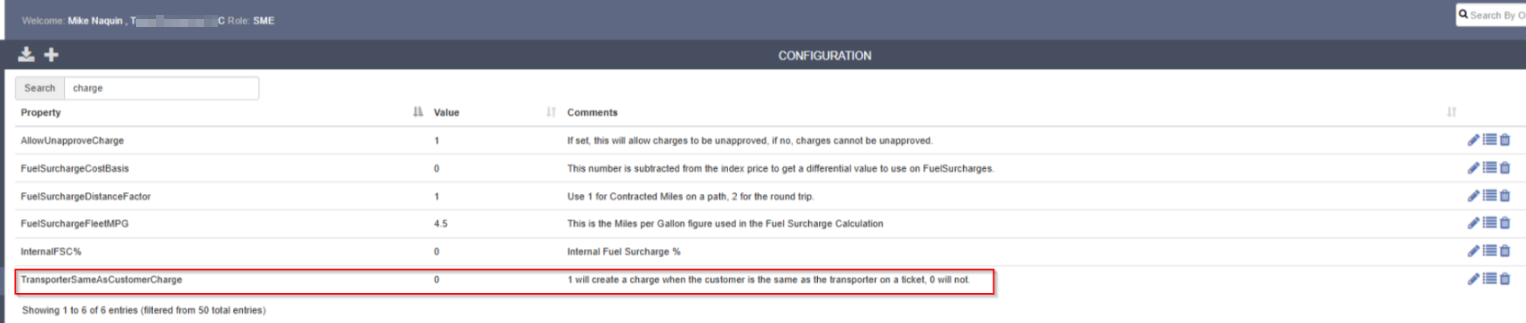
The client can adjust accordingly based on how their business handles these kinds of scenarios.