Password Policy Configuration
Overview
This application-wide configuration enforces security rules for user authentication. It defines password length, complexity, expiration, and reuse restrictions, as well as login attempt limits and session timeouts. The policy ensures that all users follow consistent security standards to protect access to the system.
Clients usually request to change the password expiration, password length, or specific requirements, etc. This password policy configuration can be set through the Config file (YAML format) per environment under the user_security field, and is application-wide; therefore, it cannot be set individually for specific users.
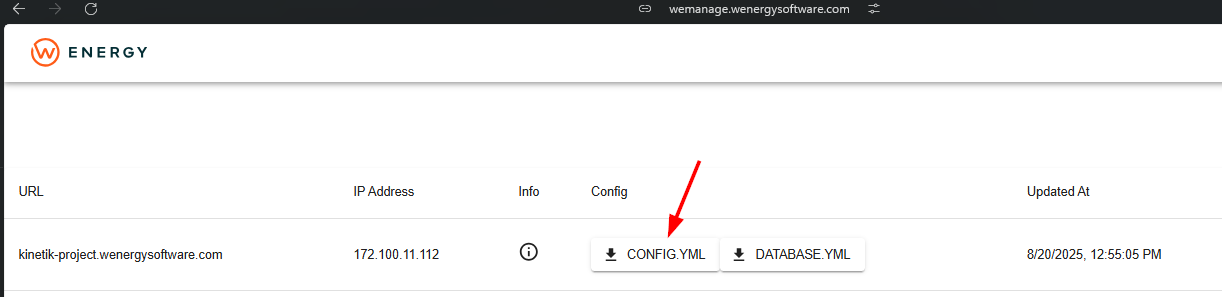
This config defines the rules and restrictions for user passwords and login attempts. The config file can be found through Wemanage or by querying the file directly in the instance. Please check some of the security configurations available.
Password rules
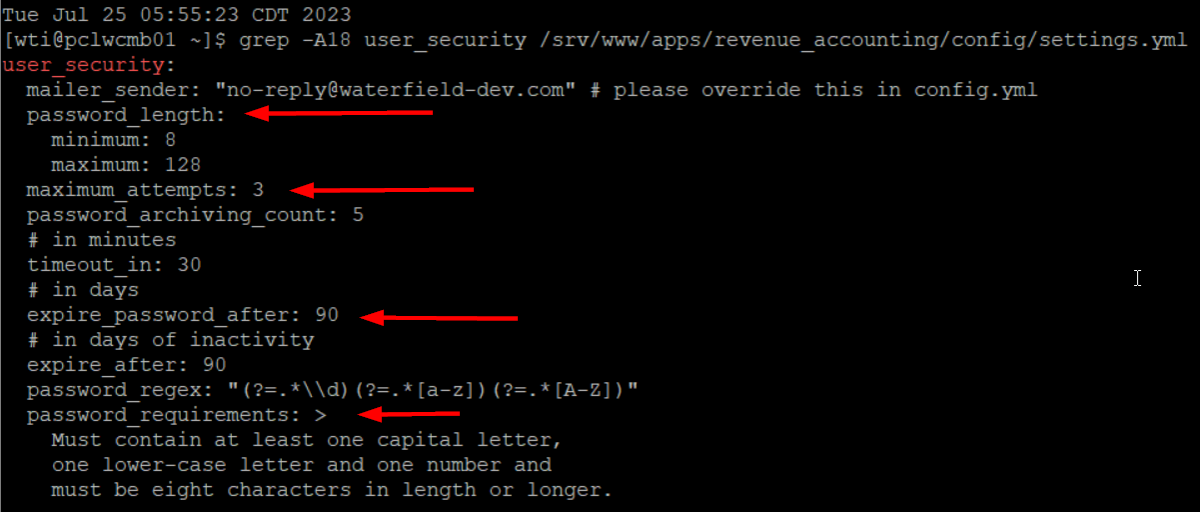
password_length:
minimum: 8- Passwords must be at least 8 characters long.maximum: 128- Passwords can be up to 128 characters long.
maximum_attempts: 3
A user can only enter the wrong password 3 times before being locked out.
password_archiving_count: 5
The system remembers the last 5 passwords used and prevents reusing them.
Session/expiration rules
timeout_in: 30
Session timeout: if inactive for 30 minutes, the session ends.
expire_password_after: 90
Passwords expire after 90 days
expire_after: 90
If the account is inactive for 90 days, it expires/gets locked.
Password complexity
password_regex:
"(?=.*\\d)(?=.*[a-z])(?=.*[A-Z])"
→ Requires:At least one digit (
\d)At least one lowercase letter (
[a-z])At least one uppercase letter (
[A-Z])
password_requirements:
Explicitly states:Must contain one capital letter
Must contain one lowercase letter
Must contain one number
Must be 8 characters or longer
This is how it looks, and some of their possible rules:
File in Wemanage: