
Owner Amounts Disappearing After Transfer Attempt
🤔 Problem
When attempting to move suspended funds (Owner Amounts from Owner A to Owner B) through a transfer, the amounts did not successfully transfer. Instead, the funds were retained under the original owner and marked as Inactive. This creates a discrepancy between the expected outcome (funds transferred to the new owner) and the actual system behavior, where the OAs are not visible through the UI.
🌱 Solution
We’ll outline the steps to locate the missing Owner Amounts and reactivate them so they can be processed again.

NOTE: In this ticket, the transfer failed due to an Effective Date issue. Once the client used a different date, the OAs transferred without any problems. Since there’s no single root cause and transfers may fail for different reasons, the steps provided here are meant as a general approach to help unblock the client.
Verify if the amounts are still under the original Owner (Owner A). Run the following script in the database to query the Owner Amounts.
- SQL
select owner_number, accounting_date, active, source, status, from_prior_period, count(id) as rec_cnt, sum(net) as net_amt from
owner_amounts
where owner_number = '#####' -- Replace the ##### with the original owner number
group by owner_number, accounting_date, active, source, status, from_prior_period
order by owner_number, accounting_date, active, source, status, from_prior_period
It should return something like the below, where the field active is 0 and the source should be “Transfer”
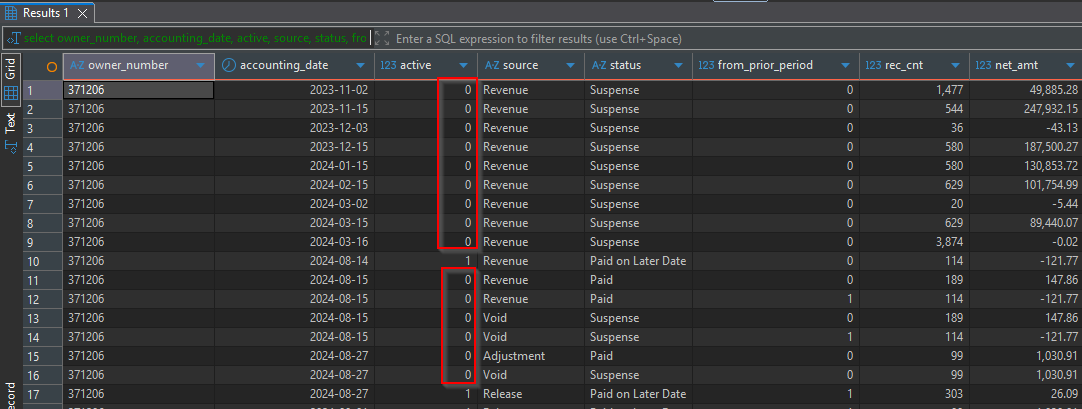
Check if the new Owner (Owner B ) has any amounts assigned after the transfer attempt. Use the script above and change the
owner_numberonly.

Once you confirm that the Owner Amounts weren’t transferred and are Inactive (Active = 0 and not visible through the UI), one of the solutions is to activate the Owner Amounts again so that the user can attempt the new transfer without issues. The following script will update the records and make them available through the application.
Run the script using the
Selectfirst to validate how many records should be updated and verify that they are valid.- CODE
update oa set oa.active = 1, oa.lock_reason = null
--select uot.number, uotf.owner_amount_id, oa.id, oa.accounting_date, oa.owner_number, oa.source, oa.status, oa.active, oa.net, oa.lock_reason from
-- 1668 records should be updated.
from owner_amounts oa
join upstream_owner_transfer_froms uotf
	on uotf.owner_amount_id = oa.id
join upstream_owner_transfers uot
	on uotf.upstream_owner_transfer_id = uot.id
where uot.number = '#####' -- Replace ##### with the failed transfer.
and uotf.owner_amount_id is not null
Once confirmed, run the script above in a Project box first to confirm that it works as intended and attempt to perform the transfer. If it works, please refresh from Prod a non-prod client’s environment and run the script there. As soon as you confirm that everything is working as intended and that the amounts are now visible and can be reprocessed, ask the client to verify and get approval to run this in Prod.

This script applies only Owner Amounts transfers/suspense script. This doesn’t apply for LOI, please verify with an SME the best approach for LOIs.
Please check the related tickets to verify the process.
📎 Related articles
WEDEVOPS-33041