
How to remove a Gas Plant number from Production Accounting Asset
Users may need to remove a certain Gas Plant from a specific asset. This article explains how to remove that Gas Plant association from the ONRR setup.
Instructions 📑
The Gas Plants are setup under ONRR Setup → ONRR Reporting Entities by each well. If you open up a well you will see the ‘Gas Plants’ tab.
Steps:
Go to ONRR Setup
Go to ONRR Reporting Entities
Go to the ‘Gas Plants’ tab
Click on the small 'x' next to the Gas Plant Number to delete
Click on Update to apply changes
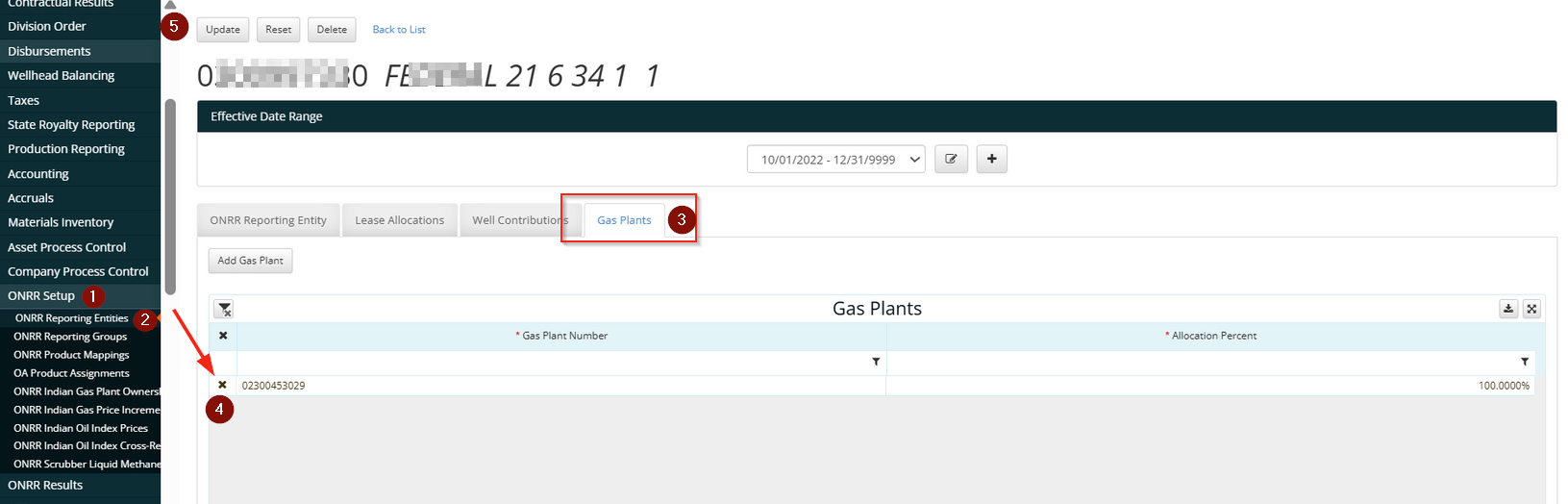
As the last step, refresh the screen to verify that the Gas Plant was removed.