
Division Order - Submitted Transfer is not displaying in 'Transfer to Approve' queue
🤔 Problem
The client has reported an issue regarding a transfer submission. Although the transfer was submitted successfully, they were unable to approve it because the record did not appear in the ‘Transfer to Approve’ queue. However, the transfer was visible in the workflow admin screen.
🌱 Solution
Steps to check:
First, verify the status of the transfer by checking the workflow_events table.
select * from workflow_events
where entity_number = 'Insert Transfer Number'
order by id asc
In this situation, the transfer was marked as ‘Assigned’ and had already been submitted.
Two fields, assigned_to_group and current_participant_name, dictate how the transfer is displayed on the ‘Transfer to Approve’ screen:
The
assigned_to_groupwill display 'ANY' if no approval groups are configured; otherwise, it will show the name of the configured group.The
current_participant_namemust be set tosubmit_upstream_owner_transfer.
On Ticket WESS-15764 , The
current_participant_namehas been configured to ‘approve_upstream_owner_transfer’.
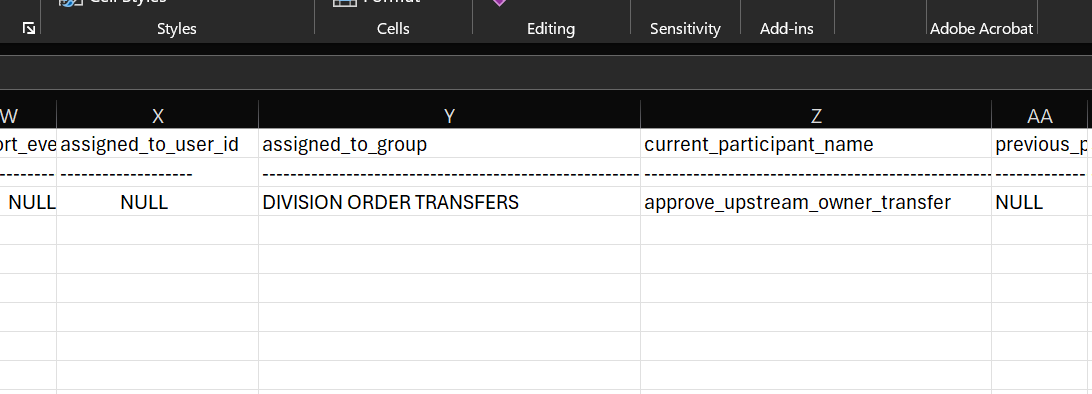
The proposed solution involves developing a script that resets the
current_participant_namefield tosubmit_upstream_owner_transferfor the transfer that is currently stuck.
update upstream_owner_transfers set current_participant_name = 'submit_upstream_owner_transfer' where number = '12635'Once the script has executed, the client will have the opportunity to approve the transfer.