
Division Order - Escheatment/ Due Diligence Issue
🤔 Problem
The client has reported an issue where, after executing the ‘Due Diligence’ and ‘Finalize Escheatment’ CPC processes, the ‘Due Diligence’ Owner Amounts did not update to ‘Escheatment’ following the completion of the 'Finalize Escheatment' process.
Below is a guide on the Escheatment Process.
🌱 Solution
Under Global Setup → Escheatment Rules, you can establish the Escheatment guidelines as detailed in the document above. This section allows you to define various parameters, including States, Start Dates, Escheatable Suspense Codes, and Exempt Owners.
Upon reviewing the Owner Amounts that the client indicated were not in Escheatment status, along with the owners listed under ‘Exempt Owners,’ we confirmed that all expected Escheated owners were indeed included in the ‘Exempt Owners’ list. This explains why they were not being processed correctly.
However, since they had already run ‘Finalized Escheatment’, the ‘Processes’ checkbox on the Exempt Owners tab would not allow the Exempt Owners to be deleted in the UI as the delete 'X' was greyed out.
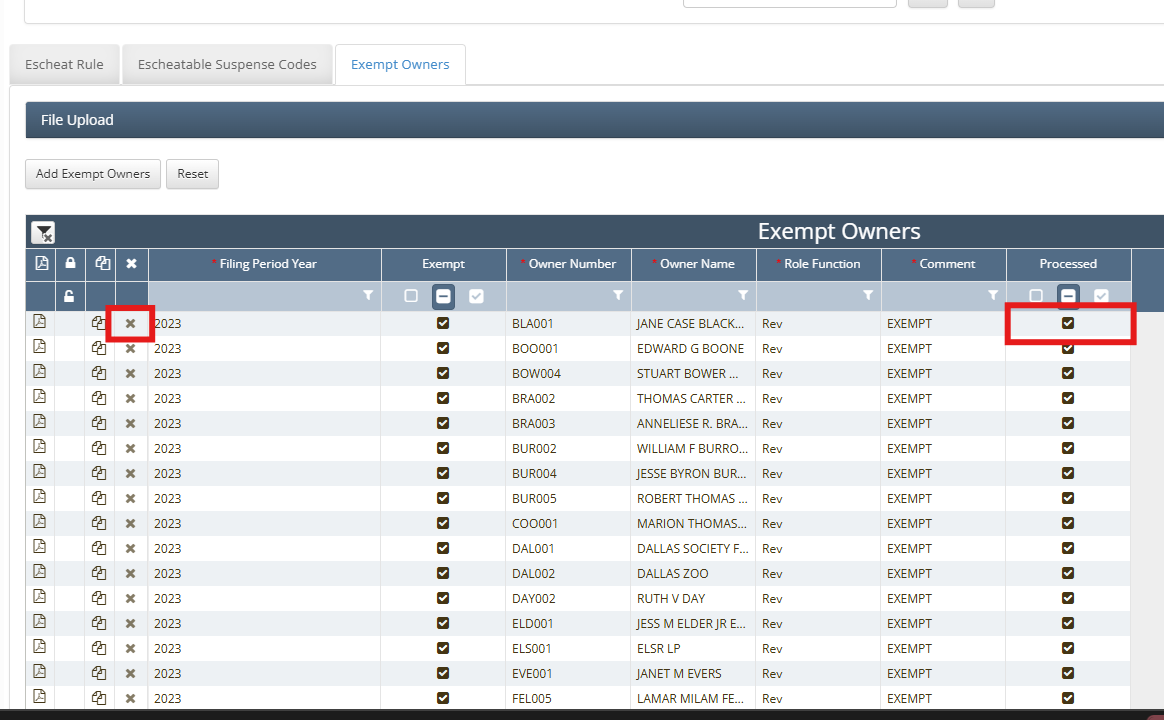
To be able to delete the faulty inputted records, we needed to create and run a script to set Processed = 0. The client then re-ran both processes and the results returned as expected.
- CODE
update escheatable_exempt_owners set processed = 0 where filing_period_year = '2025'